and register top-ups
Spend ¥5,000 or more and you get 10% back as an Apple Gift Card code. 7-Eleven, FamilyMart, Lawson and Ministop each count separately.
per chainCapped at ¥50,000 spent
Nov 2, 23:59Buy by Nov 1
on Dec 2Not by email
These open each chain’s official campaign page (Japanese only). Register on the page of the chain where you paid. You’ll need your own My Number Card and the Myna app to register.
This post contains a referral code. Campaign terms are from the four chains’ official campaign pages (checked and updated ). Always confirm on the official page.
From Monday, October 26 to Sunday, November 1, 2026, Japan’s four big convenience store chains, 7-Eleven, FamilyMart, Lawson and Ministop, are running the same Apple campaign. Buy Apple Gift Cards or top up your Apple Account at the register, reach ¥5,000 or more at one chain, then register your receipts online. You get 10% of the total back as an Apple Gift Card code, up to ¥5,000 per chain. Do all four and that’s up to ¥20,000.
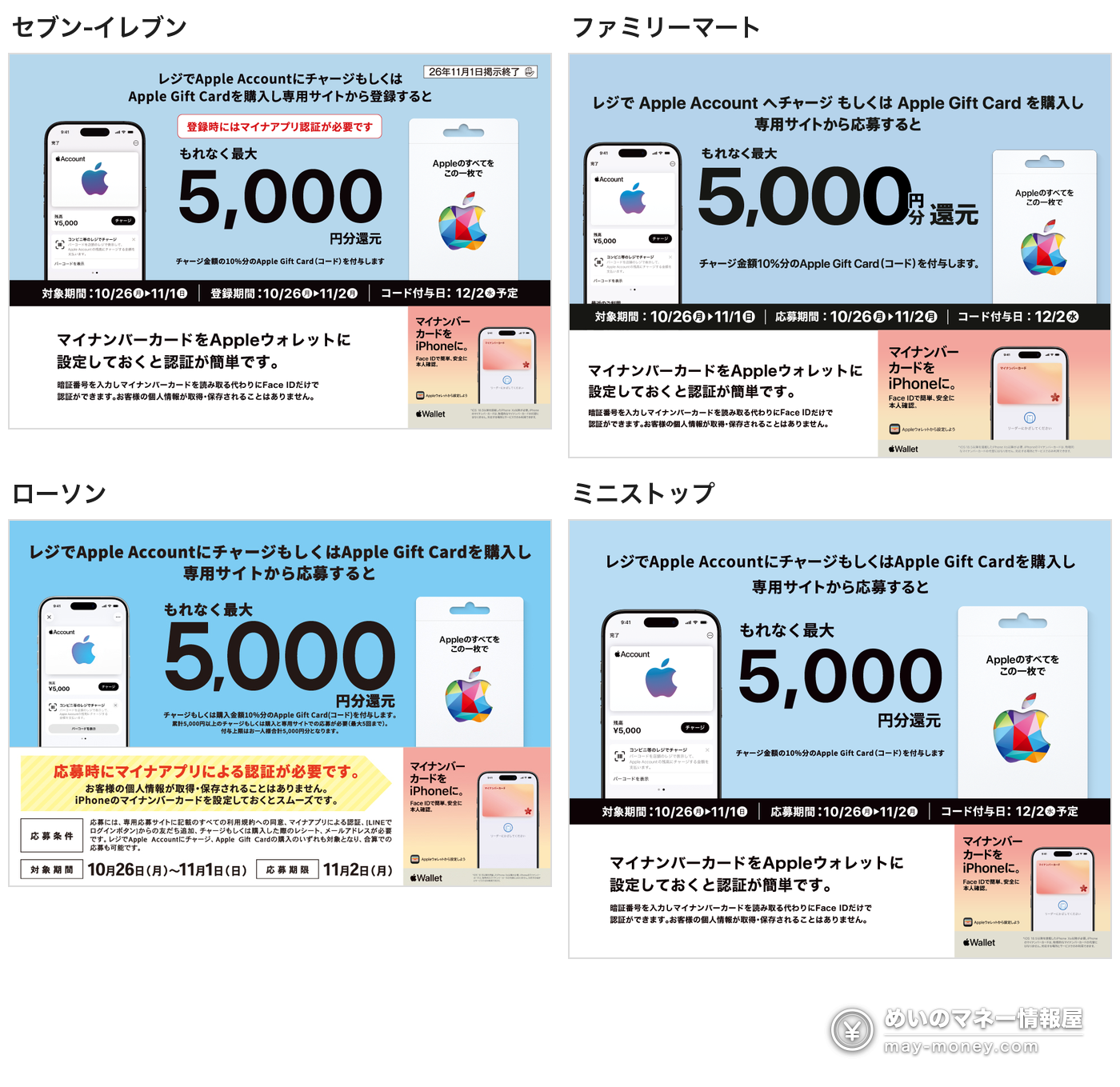
- Both physical Apple Gift Cards and Apple Account top-ups at the register count, and they add up
- 10% back once you reach ¥5,000 at a chain, capped at ¥5,000 per chain (¥50,000 spent)
- New this time: gift cards count, and registration requires My Number Card verification in the Myna app
- Buy by Nov 1 (Sun) 23:59, register by Nov 2 (Mon) 23:59, codes arrive on LINE on Dec 2 (Wed)
- Up to 5 receipts per chain, and only one card number per receipt, so pay for each card separately
- 7-Eleven and FamilyMart prize draws take the same receipts: ¥5,500–¥6,100 guaranteed on ¥50,000
- What counts and what you get
- What changed since the August round
- You need a My Number Card: what to prepare
- How to register, step by step
- How the four chains differ
- Stack the 7-Eleven and FamilyMart prize draws too
- Getting the full ¥20,000: splitting your receipts
- Key dates
- Common mistakes
- What you can use the codes for
- FAQ
What counts and what you get
All four campaign pages list the same rules. The campaign is organized by InComm Japan and run by VAJ Digital Design, and the pages state that it isn’t provided or sponsored by Apple.
2. Buying Apple Gift Cards
Top-ups only, cards only, or a mix: it all adds up
It isn’t a discount at the till. You pay full price and get the 10% back later as a code. Spend ¥50,000 and you get ¥5,000 back, so ¥50,000 buys you ¥55,000 of Apple balance, which works out to about 9.1% off (5,000 ÷ 55,000).
The four chains share the same rules but run four separate campaigns, each with its own registration page, its own LINE account and its own cap. Send each receipt to the chain where you paid.
What changed since the August round
The same four chains ran a very similar campaign from August 17 to 30 (see 10% back on Apple Account top-ups, August round). If you joined last time, don’t go by the old rules:
You need a My Number Card: what to prepare
This is the part that trips up most foreign residents. You can’t register without your own My Number Card. Foreign residents with a My Number Card can use it like anyone else. A notification card or a document with your number on it won’t work. You’ll need:
- Your My Number Card and the Myna app (マイナアプリ, from the Digital Agency, on iPhone and Android). If you’ve added your card to Apple Wallet on your iPhone, Face ID is enough; no PIN or card scan.
- LINE, to add the campaign’s official account and receive the code
- An email address you can receive mail at (not a throwaway address, not one with “+” or “-”, and avoid some overseas domains)
- A photo of each receipt, top to bottom in one shot
- For register top-ups only: an iPhone on iOS 17 or later with Apple Account added to Wallet
Official guides (Japanese): Myna app (Digital Agency) / How to verify with the Myna app / My Number Card on iPhone / Apple: adding money to your Apple Account
According to the campaign, the verification only collects an anonymous service ID (PPID). It doesn’t collect your My Number, name, address, date of birth or gender.
How to register, step by step
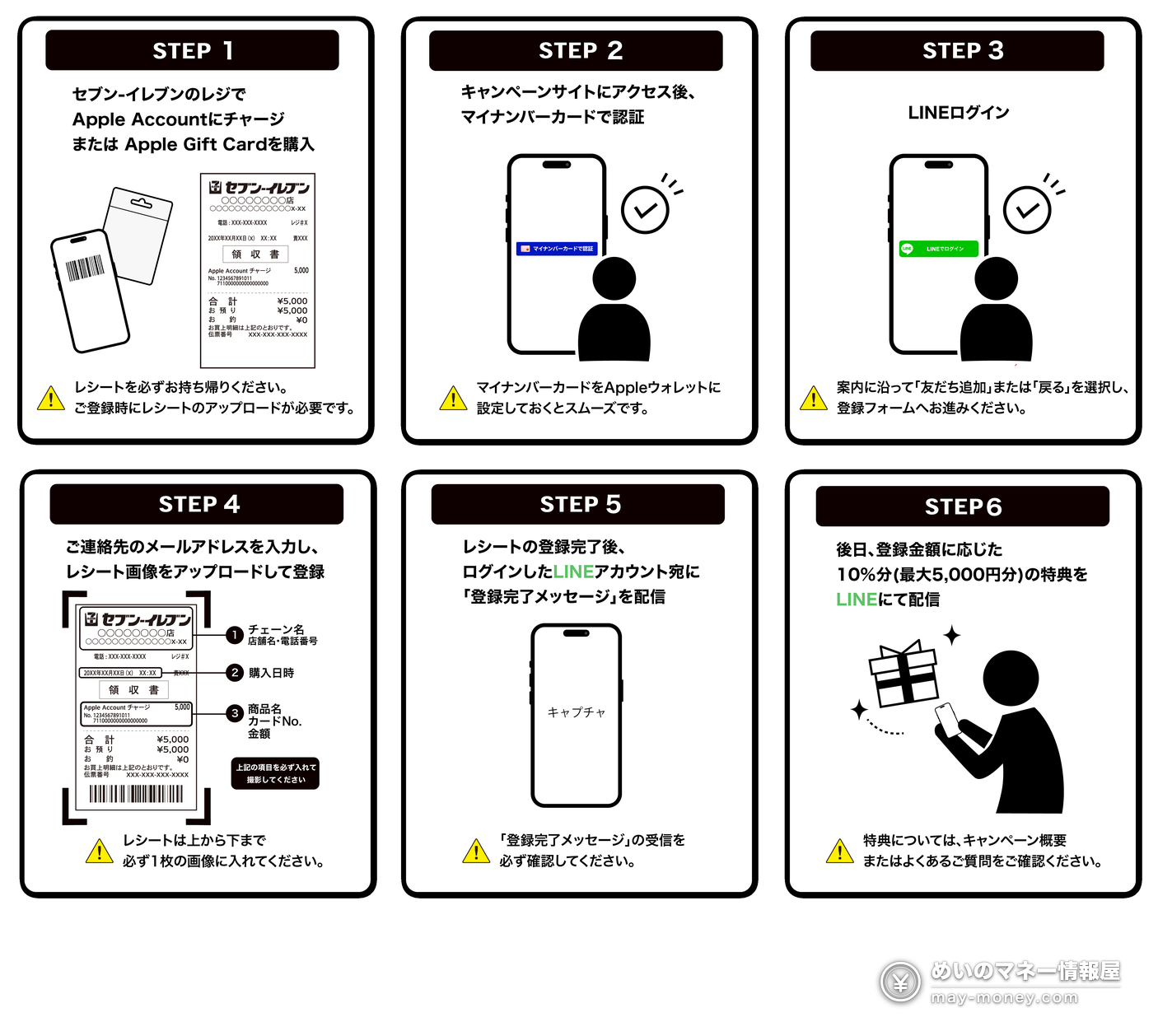
- At the register, top up your Apple Account or buy an Apple Gift Card. Keep the receipt.
- Open that chain’s campaign page, tap “ご登録はこちら” (FamilyMart and Lawson say “ご応募はこちら”), and verify your My Number Card in the Myna app.
- Log in with LINE and add the campaign’s official account as a friend. If you’ve already added it, tap “戻る” to go back to the form.
- Enter your email address and upload a photo of the receipt, the whole receipt in one image.
- You’re done when LINE sends a “登録完了メッセージ” (registration complete) message. If nothing arrives within an hour and there’s no record on My Page, the registration may not have gone through.
- On December 2 (Wed), your 10% Apple Gift Card code arrives on LINE.
To top up at the register: in Wallet, open Apple Account → “チャージ” (Add Money) → “コンビニ等のレジでチャージ” (top up at a convenience store register). Show the barcode to the cashier and pay the amount you want to add. Top-ups and cards can’t be canceled or refunded.
How the four chains differ
The campaign is identical. What differs is which stores count, how you can pay for a top-up, and whether there’s a small extra on top.
- Stores
- Stores nationwide (some excluded)
- Paying for a top-up
- Cash or nanaco
- Extra
- Show your 7-Eleven app member code at checkout and get 1 mile per ¥200 on prepaid cards and Apple Account top-ups
- Official links
- Campaign page / FAQ / Top-up guide
- Stores
- Stores nationwide (some excluded)
- Paying for a top-up
- Cash or FamiPay
- Extra
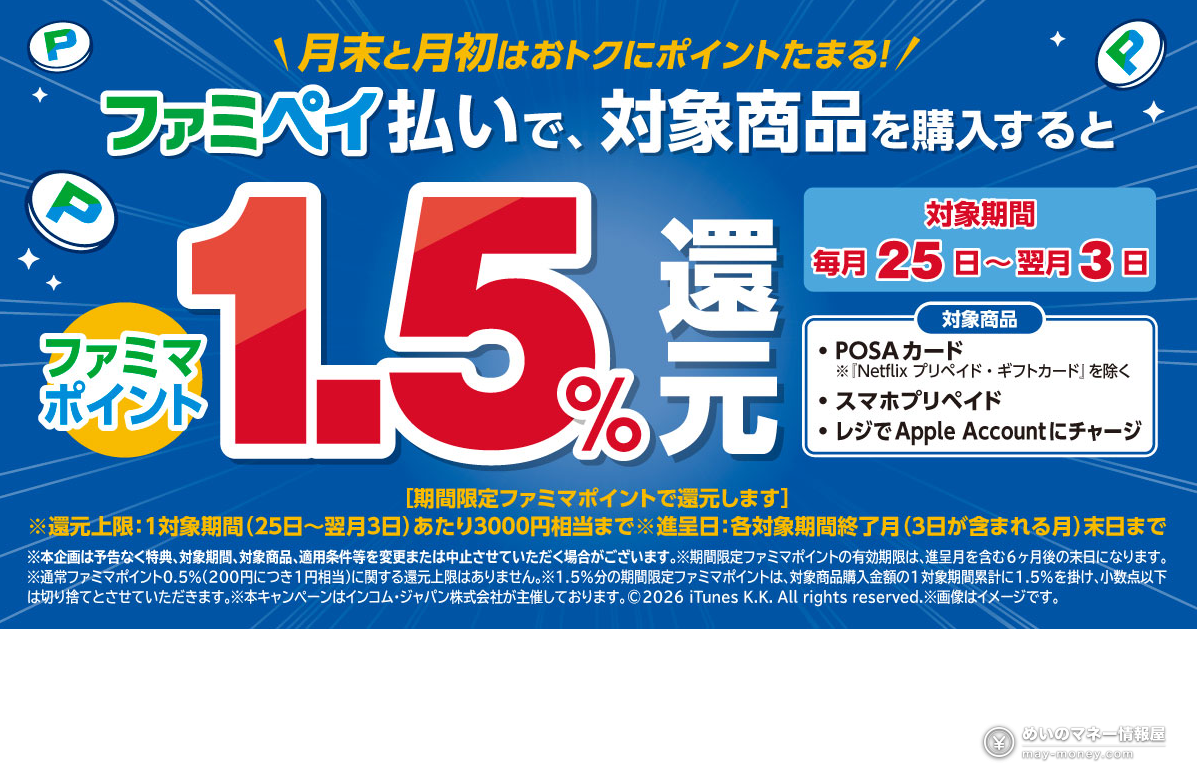
- From the 25th to the 3rd of each month, POSA cards and register Apple Account top-ups paid with FamiPay (barcode) earn 1.5% in limited-time FamiMa points on top of the usual 0.5% (up to ¥3,000 per period). This whole campaign falls inside that window
- Official links
- Campaign page / FAQ / Top-up guide
- Stores
- Lawson, Natural Lawson, Lawson Store 100 and L-mini mart (the widest range)
- Paying for a top-up
- Cash
- Official links
- Campaign page / FAQ / Top-up guide
- Stores
- Stores nationwide (some excluded)
- Paying for a top-up
- Cash or WAON
- Note
- If you normally use Smart Receipt (digital receipts), ask for a paper receipt too and register with that
- Official links
- Campaign page / FAQ / Top-up guide
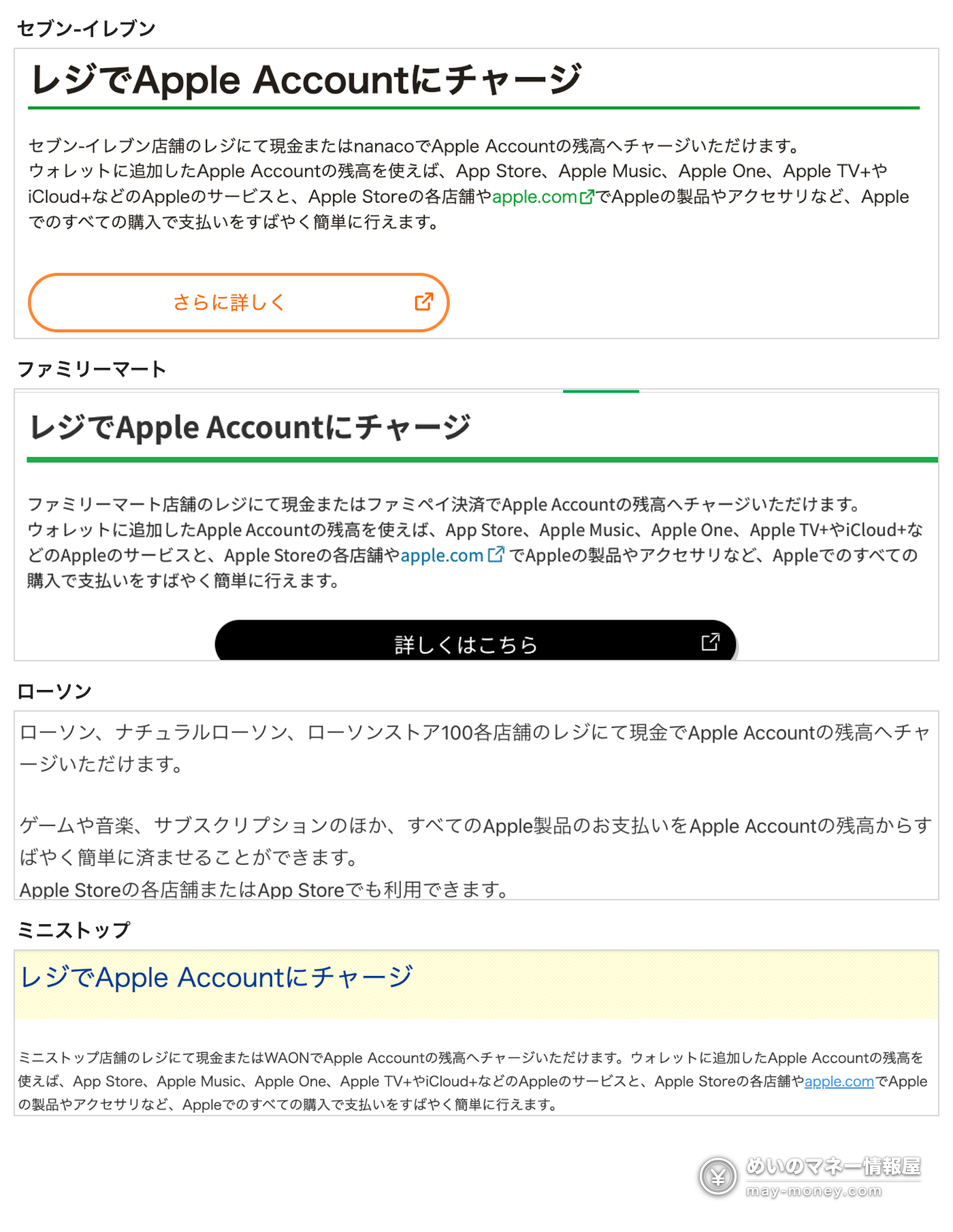
The payment methods above come from each chain’s own “top up your Apple Account at the register” page (below). You can add ¥100 to ¥100,000 at a time, and none of the four lists credit cards. How you can pay for physical gift cards varies by store, so ask at the register.
FamilyMart’s 1.5% covers POSA cards, smartphone prepaid and register Apple Account top-ups, paid with the FamiPay barcode (Apple Pay or Google Pay with a FamiPay virtual card doesn’t count). It’s capped at ¥3,000 per period (25th to 3rd) and paid by the end of the month the period ends.
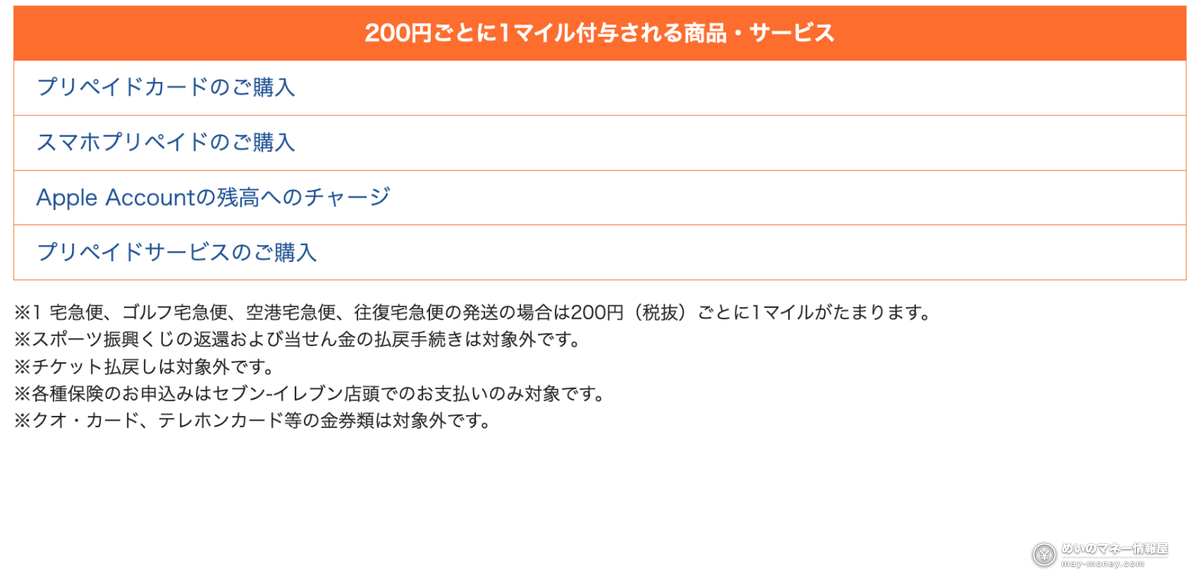
More on FamiPay in our FamiPay guide, and on loading nanaco in our nanaco guide. Official pages: FamiPay 1.5% back / 7-Eleven app miles
Stack the 7-Eleven and FamilyMart prize draws too
On top of the Apple 10% back, 7-Eleven and FamilyMart are each running a prepaid card prize draw right now. Apple Gift Cards and register top-ups both count, so the same receipt can go to both. FamilyMart’s page says the same card can be entered in other prepaid card campaigns running at the same time, and 7-Eleven’s terms don’t prohibit it. Each draw has its own site: you make a My Page there and upload the receipt again.
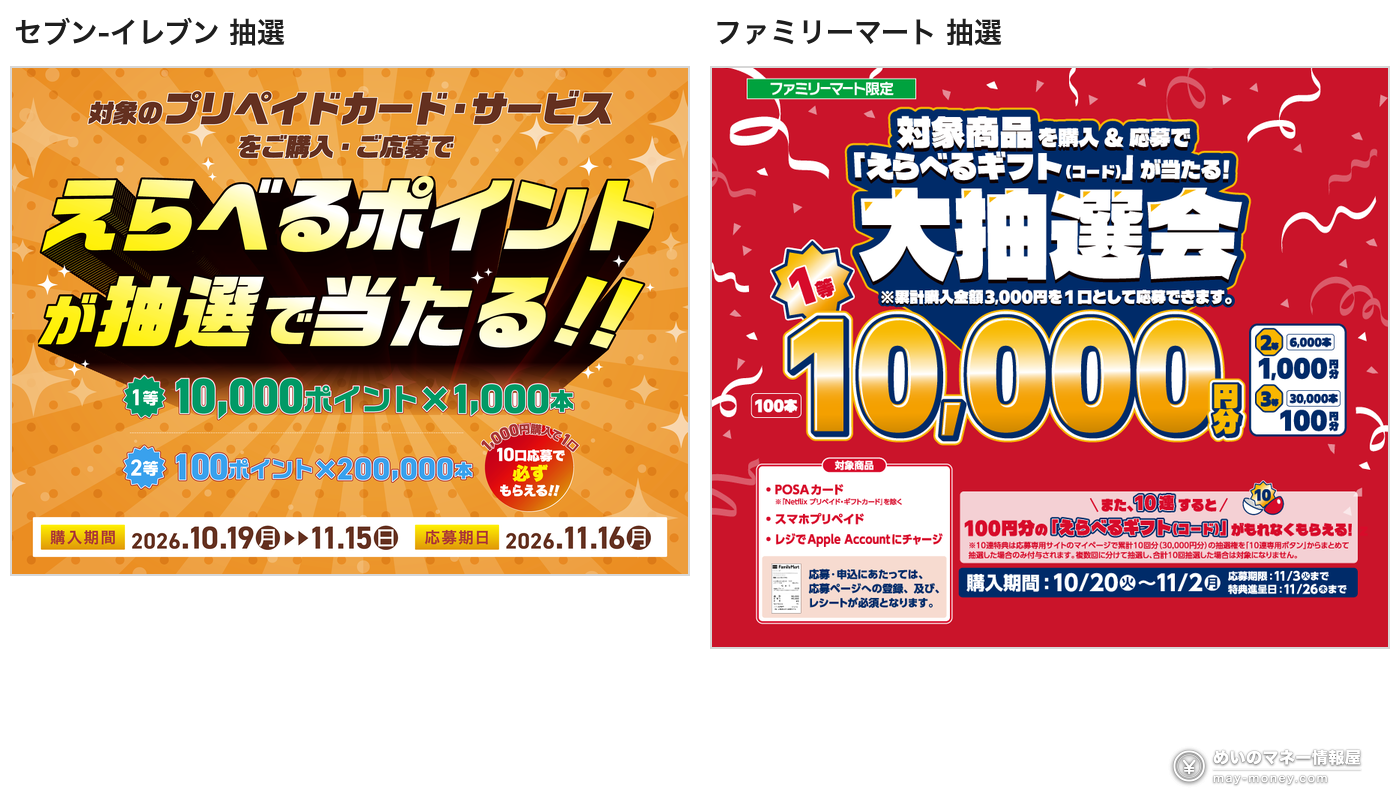
Campaign pages: 7-Eleven draw (terms) / FamilyMart draw
7-Eleven: Erabeteru Point draw
FamilyMart: Erabeteru Gift draw
If you spend ¥50,000 at one chain, here’s what you get for sure, before any luck:
FamilyMart’s 2% is the usual 0.5% plus the 1.5% for FamiPay payments (POSA cards or register top-ups) from the 25th to the 3rd, capped at ¥3,000 per period. What 7-Eleven miles are worth depends on the rewards on offer, so they aren’t counted in yen here. A 1st prize would add more, but that’s down to luck.
Getting the full ¥20,000: splitting your receipts
The receipts are the catch. You can register up to 5 per chain, and each receipt may show only one card number. To hit ¥50,000 at one chain, your receipts need to average ¥10,000 or more. Buying several cards? Pay for each one separately.
Codes are issued per receipt. The official FAQ’s example: register receipts for ¥25,000, ¥10,000 and ¥30,000, and you get three codes for ¥2,500, ¥1,000 and ¥1,500 (the third is cut off at the cap).
You can register as soon as you have the receipt; no need to wait until the end.
Key dates
Common mistakes
- One card number per receipt. If you buy several cards, or other things at the same time, pay separately.
- Five receipts per chain, max. Each receipt can only be registered once.
- Use your own My Number Card. Registering with a family member’s or friend’s card is illegal and voids the entry.
- Register with the chain where you paid. Cards bought at another chain, or outside the dates, don’t count.
- Don’t block the campaign’s LINE account before the code arrives, and don’t change your LINE account details. The message won’t be resent.
- Email: allow mail from vdpro.jp so their messages don’t get filtered.
- Not in private browsing. After the LINE login you can’t get back to the form; use a normal browser window.
What you can use the codes for
Once added to your Apple Account, the balance works for App Store apps and games, subscriptions like iCloud+ and Apple Music, and iPhones, iPads and accessories from apple.com or Apple Store. The catch: it’s for purchases from Apple in Japan only, and it can’t be exchanged for cash.
For the full list, see Apple’s pages: What you can buy with Apple Gift Card or Apple Account balance / Using an Apple Gift Card
The codes only arrive on December 2, so they won’t help with anything you’re buying this week. They’re easiest to use up if you’re planning a new iPhone around the end of the year, or already pay for iCloud+ or another subscription every month.
FAQ
- Q. Do physical Apple Gift Cards from the store count?
- Yes, this time they do. The campaign covers both topping up your Apple Account at the register and buying Apple Gift Cards, and the two add up. In August, cards didn’t count, so don’t mix the two rounds up.
- Q. Is this campaign official? Is it safe?
- It’s organized by InComm Japan and run by VAJ Digital Design, and the registration pages are on the vdpro.jp domain. FamilyMart’s official campaign list links straight to its page. If you’re unsure, go in from each chain’s own campaign list. It has nothing to do with messages asking you to buy cards and send someone the code; never share a code.
- Q. Can I join without an iPhone?
- Yes. Register top-ups need an iPhone on iOS 17 or later, but buying cards doesn’t, and the Myna app you need for registration has an Android version.
- Q. Can I join without a My Number Card?
- No. The campaign says registration requires a My Number Card and verification in the Myna app.
- Q. Does the My Number check share my personal details?
- According to the campaign, it only receives an anonymous service ID (PPID) through the Myna app, not your My Number, name, address, date of birth or gender.
- Q. Can I join at all four chains? How does the cap work?
- Yes. They’re four separate campaigns with separate registration pages and LINE accounts, and the cap is ¥5,000 per chain, so up to ¥20,000 in total. The terms don’t restrict joining another chain’s campaign.
- Q. I bought several cards in one transaction. Can I still register the receipt?
- Not if the receipt shows more than one card number. The official FAQ asks you to upload a receipt that shows only one card number. The simplest fix is to pay for each card separately.
- Q. Can I also enter the 7-Eleven and FamilyMart prize draws?
- Yes. Apple Gift Cards and register top-ups count for both draws, and the same receipt can be entered in each. 7-Eleven gives 1 entry per ¥1,000 and a guaranteed 100 points with the 10-entry draw button; FamilyMart gives 1 entry per ¥3,000 and a guaranteed ¥100 when you draw 10 at once. Each draw has its own registration site.
- Q. Can I pay by credit card?
- For register top-ups, the chains list cash or nanaco (7-Eleven), cash or FamiPay (FamilyMart), cash or WAON (Ministop) and cash only (Lawson). No credit cards. For physical cards, ask at the register.
- Q. Does a purchase on November 2 count?
- No. November 2 is only the registration deadline; purchases and top-ups must be made by 23:59 on November 1.
- Q. When do the codes arrive, and do they expire?
- They’re planned for December 2 (Wed) on LINE, with no redemption or expiry date. If yours hasn’t arrived by 17:00 on December 16 (Wed), contact the campaign through the inquiry form on its page.
Buy by Nov 1 (Sun) 23:59; register by Nov 2 (Mon) 23:59.
- Sources: 7-Eleven campaign page (including FAQ and terms) / FamilyMart / Lawson / Ministop
- Payment methods: 7-Eleven / FamilyMart / Lawson / Ministop (each chain’s Apple Account top-up page)
- Extras: 7-Eleven app miles / 1.5% back on POSA cards with FamiPay
If you’ll pay with FamiPay at FamilyMart and haven’t signed up yet, you can enter a referral code when you register:
📚 Further reading


Get new articles by email
We will email you when a new deals article goes up. You can choose the categories, too.