Four convenience store chains,
10% back on Apple Account top-ups
7-Eleven · FamilyMart · Lawson · Ministop
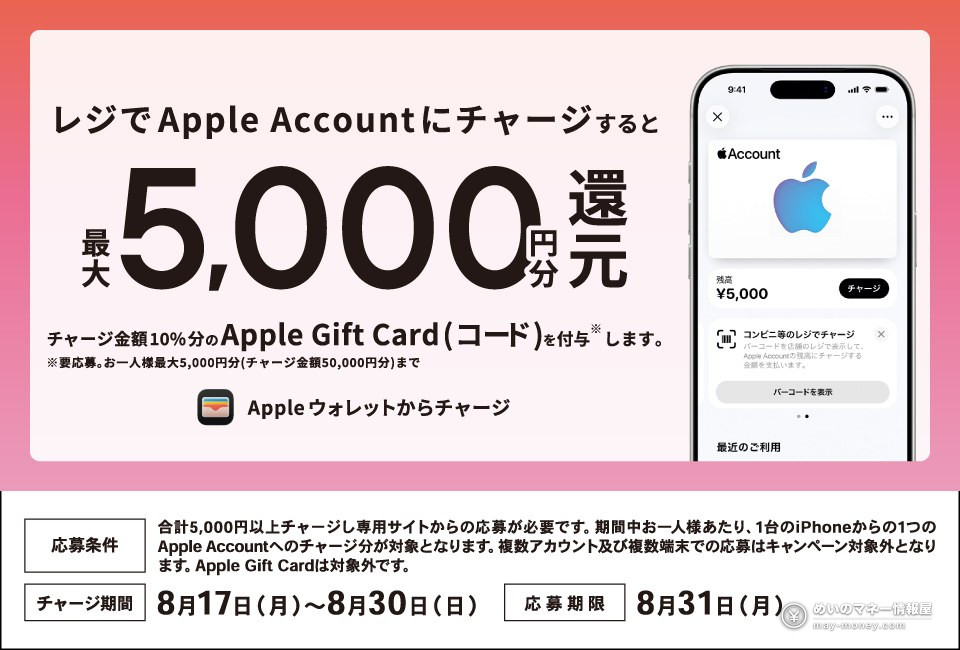
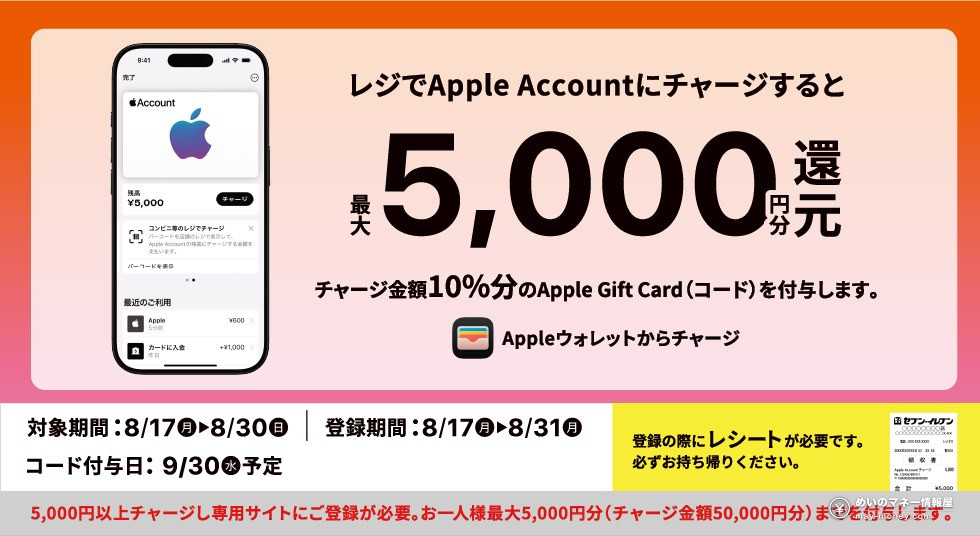
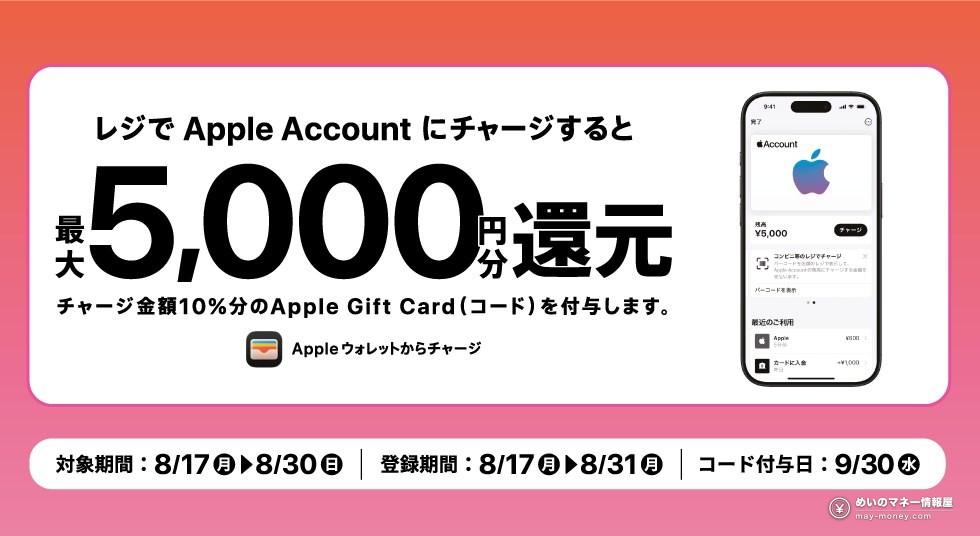
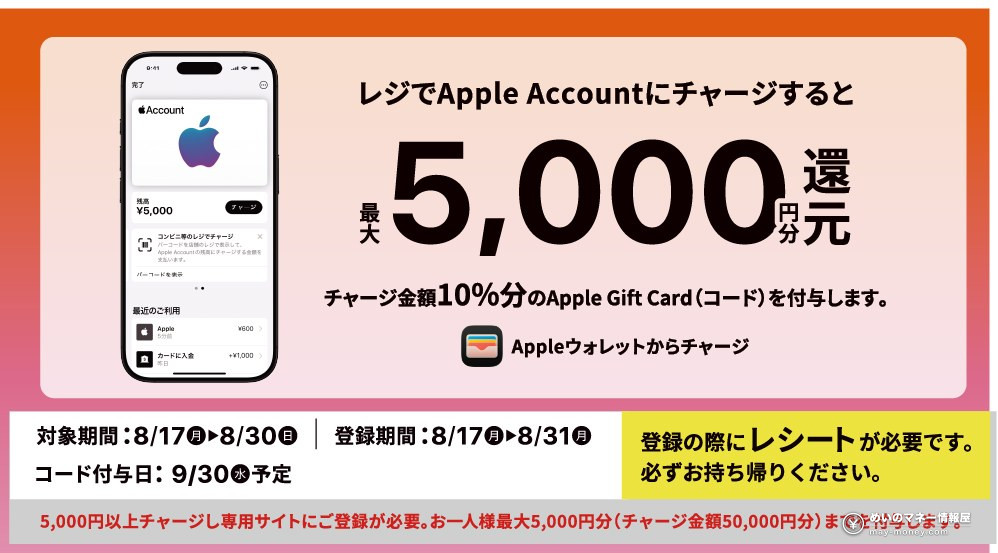
From 17 to 30 August 2026, Japan’s four biggest convenience store chains are all running the same campaign. Top up your Apple Account at the register, reach ¥5,000 or more across the period, then register on that chain’s campaign site, and you get 10% of what you loaded back as an Apple Gift Card (code). The cap is ¥5,000 back per chain, which corresponds to ¥50,000 loaded.
 7-ElevenGo to registration →
 FamilyMartGo to registration →
 LawsonGo to registration →
 MinistopGo to registration →
Register on the page for the chain you topped up at. You’ll need three things: a photo of the receipt, the email on your Apple Account, and the campaign’s official LINE account added as a friend.
- What you do and what you get
- How the four chains differ
- Which chain pays most, once you count the payment method
- Five steps if you’ve never done this
- Two deadlines: 8/30 and 8/31
- Six places people trip up
- Two campaigns you can stack on top
- What the balance can actually buy
- Frequently asked questions
What you do and what you get
The rules are short, and all four chains word them the same way.
| Item | Details |
|---|---|
| What qualifies | Topping up your Apple Account at the register (the “コンビニ等のレジでチャージ” option in Wallet) |
| Threshold | ¥5,000 or more in total during the period. You don’t have to do it in one go — repeat top-ups at the same chain add up |
| Reward | 10% of the total you loaded, paid as an Apple Gift Card (code) |
| Cap | ¥5,000 back per chain (i.e. ¥50,000 loaded). Under ¥4,999 earns nothing |
| Who qualifies | Top-ups from one iPhone into one Apple Account, per person |
| Not included | Apple Gift Cards sold in store; anything loaded outside the period |
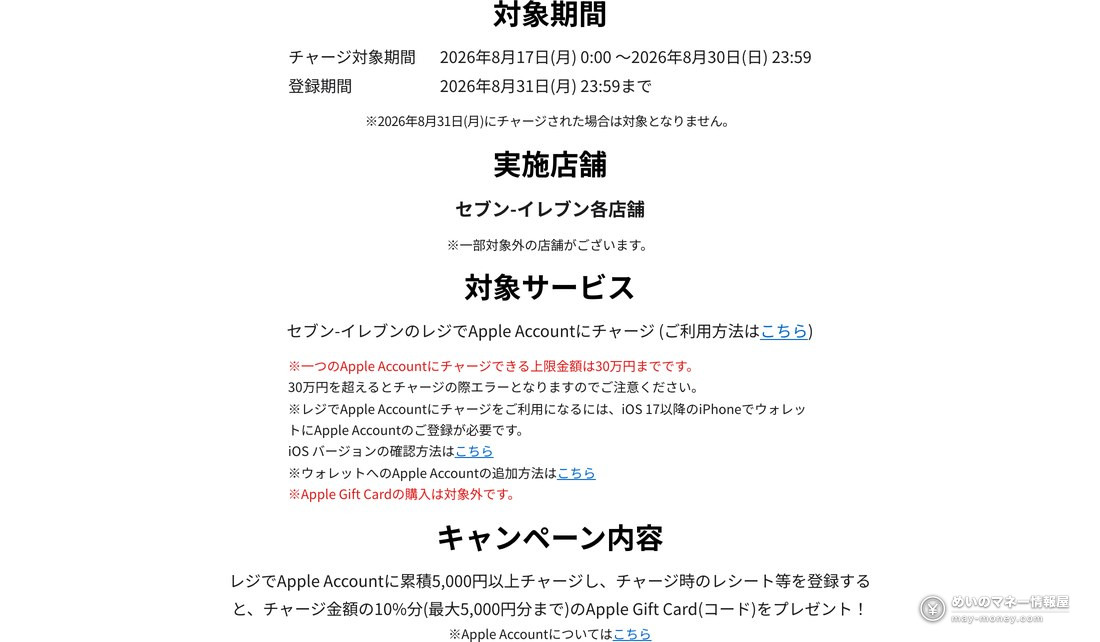
Worth being precise about: the 10% is a rate on what you load, not a discount. Load ¥50,000 and you get ¥5,000 back, so ¥50,000 buys you ¥55,000 of balance.
Also, although the terms match, these are four separate campaigns. Separate conditions, separate deadlines, separate registration pages — and separate caps. If you do more than one chain, each receipt has to go to that chain’s own registration page.
How the four chains differ
Since the core terms are identical, the real differences are the store types included and the campaigns running alongside.
| Chain | Stores included | Running alongside | Note |
|---|---|---|---|
| 7-Eleven | All stores (a few excluded) | Erabel Point lottery (to 8/30) | — |
| FamilyMart | All stores (a few excluded) | FamiMa Point split pool (to 8/30) | The split pool needs the FamiPay app shown at the register |
| Lawson | Lawson / Natural Lawson / Lawson Store 100 / L Minimart | — | Widest set of store types |
| Ministop | All stores (a few excluded) | — | If you use Smart Receipt, ask for a paper receipt as well |
Lawson counts Natural Lawson, Lawson Store 100 and L Minimart too, so you can join even if the only branch near you is a Lawson Store 100. Ministop’s catch is a practical one: if you normally use Smart Receipt (the digital receipt), you cannot register with it — ask the cashier for a paper receipt as well.
Which chain pays most, once you count the payment method
Because the campaign terms match, what actually separates the four is what you’re allowed to pay with at the register. The campaign pages say nothing about this, but each chain’s own service page does. Here is what all four say, in their own words.
| Chain | From the chain’s own service page (topping up Apple Account at the register) |
|---|---|
| 7-Eleven | “現金またはnanacoで…” — cash or nanaco |
| FamilyMart | “現金またはファミペイ決済で…” — cash or FamiPay |
| Ministop | “現金または WAON で…” — cash or WAON |
| Lawson | “現金で…” — cash, with no e-money mentioned |
All four let you specify ¥100 to ¥100,000 per top-up. None of them list credit cards as a payment method.
The three that take e-money give you one more layer: whatever you earn when you load that e-money. Broken out, the whole route looks like this. Steps ③ and ④ are identical across the four chains — the difference lives entirely in the first two.
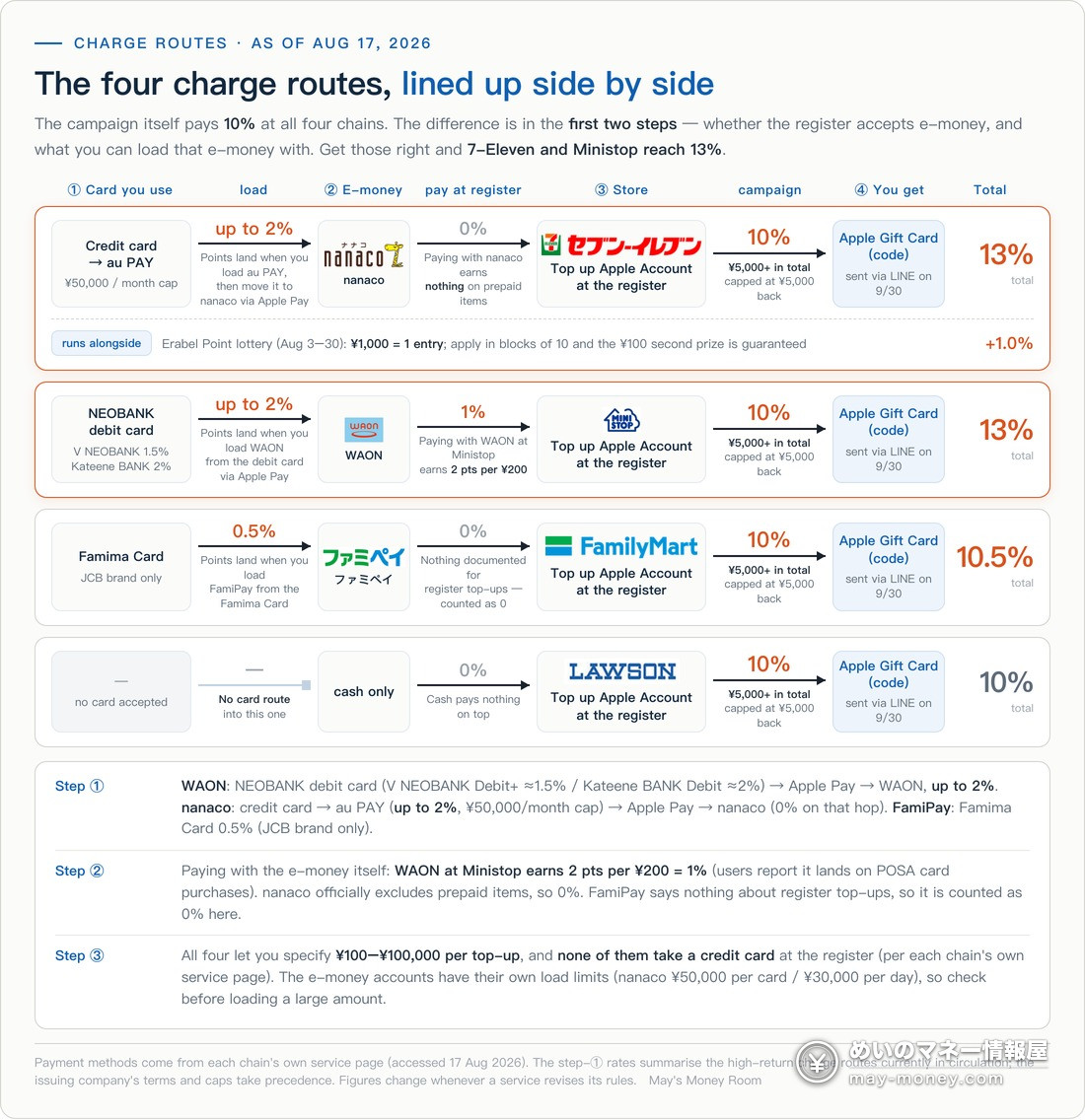
Adding the three steps up (as of 17 August 2026):
- 7-Eleven, up to 13% — 10% + up to 2% loading au PAY from a credit card (then moving it to nanaco via Apple Pay) + 1% from the Erabel Point lottery
- Ministop, up to 13% — 10% + up to 2% loading WAON from a debit card via Apple Pay + 1% paying with WAON at Ministop
- FamilyMart, up to 10.5% — 10% + 0.5% loading FamiPay from the Famima Card
- Lawson, 10% — the register only takes cash, so there is nothing to stack
That first step is card-specific. WAON: a NEOBANK debit card (V NEOBANK Debit+ ≈1.5% / Kateene BANK Debit ≈2%) → Apple Pay → WAON, up to 2%. nanaco: credit card → au PAY (up to 2%, ¥50,000/month cap) → Apple Pay → nanaco. FamiPay: Famima Card at 0.5%, JCB brand only. There’s more on each in the FamiPay guide and the nanaco guide.
① You have a NEOBANK debit card → go to Ministop. It’s the only route that earns on both the load and the payment.
② You have a credit card that earns on au PAY top-ups → go to 7-Eleven, and submit the Erabel Point entries in blocks of ten so that 1% is guaranteed rather than a gamble.
③ You only have the Famima Card → go to FamilyMart and enter the FamiMa Point split pool while you’re there.
④ None of the above → all four pay 10%. Use whichever is closest. Travelling further, or opening a new card just for this, rarely pays for the extra 0.5–3%.
Referral codes for the services on this route
These are the services from the route diagram that I have referral codes for. There’s no need to sign up for all of them — just whichever route you’re actually taking.
① Upstream — NEOBANK debit card (the start of the WAON route. I don’t have referrals for V NEOBANK Debit+ or Kateene BANK Debit specifically, so this is Dai-ichi Life NEOBANK, another bank in the same SBI Sumishin NEOBANK family.)

① Upstream — Mitsui Sumitomo Olive (Apple Pay top-ups to nanaco and WAON only earn on JCB, Mastercard and AMEX — Visa is excluded.)

① Upstream — au PAY and au Jibun Bank (the nanaco route goes through au PAY first. If you’re on au / UQ mobile / Povo 1.0, setting your au PAY card’s billing account to au Jibun Bank and meeting the family-card or annual-ETC condition pushes auto-charge to 1.5%.)

② E-money — FamiPay (needed for the FamilyMart route, and for the FamiMa Point split pool running alongside it.)

Five steps if you’ve never done this
Register top-ups are easy once you’ve set them up. The first two steps are preparation, the third happens in the store, and the last two are back on your phone.
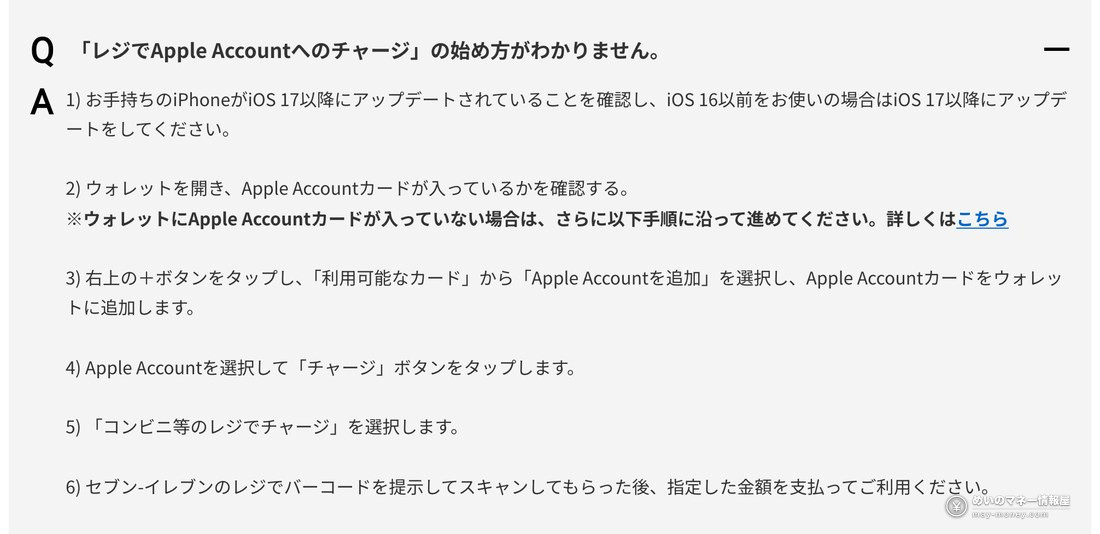
- Check that your iPhone is on iOS 17 or laterThis is a hard requirement. Settings → General → Software Update. Anything on iOS 16 or earlier needs updating first, and Android can’t take part at all.
- Add “Apple Account” to WalletOpen the Wallet app, tap “+” in the top right, and choose “Apple Account を追加” (Add Apple Account) from the available cards. You’ll end up with an Apple Account card in Wallet.
- Show the barcode at the register and payIn Wallet, open Apple Account → “チャージ” (Charge) → “コンビニ等のレジでチャージ” (Charge at a convenience store register). Let the cashier scan the barcode, say how much you want to load, and pay. Take the receipt with you.
- Register on the official site by 23:59 on 31 AugustGo to that chain’s campaign page and tap “ご登録はこちら” (Register here). You need three things: adding the campaign’s official LINE account as a friend, the email address registered to your Apple Account, and a photo of the receipt. A confirmation message arrives in LINE when it goes through — if it doesn’t, the registration probably didn’t complete.
- Receive the code in LINE on 30 SeptemberThe Apple Gift Card code is delivered as a LINE message, not by email. Redeem it in the App Store when it arrives; there’s no expiry on redeeming or spending it.
The official pages illustrate these steps, which is handy for cross-checking as you go.
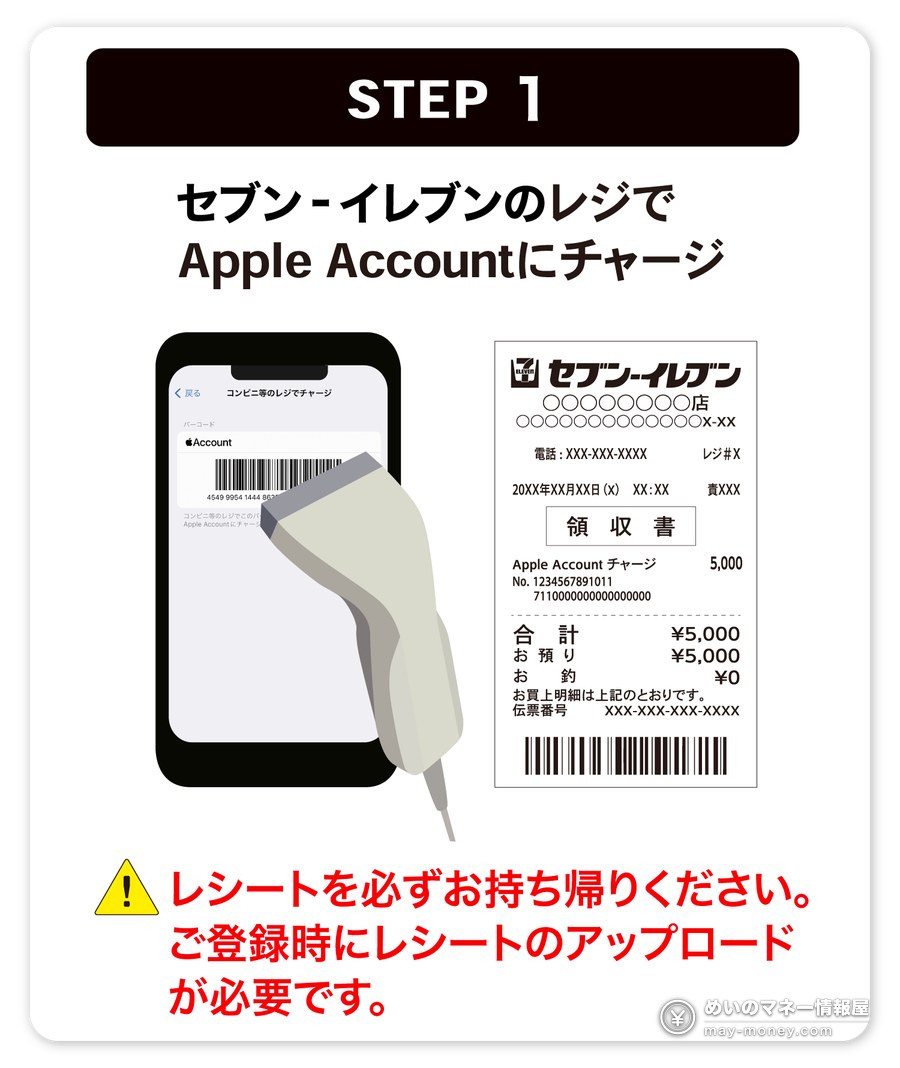
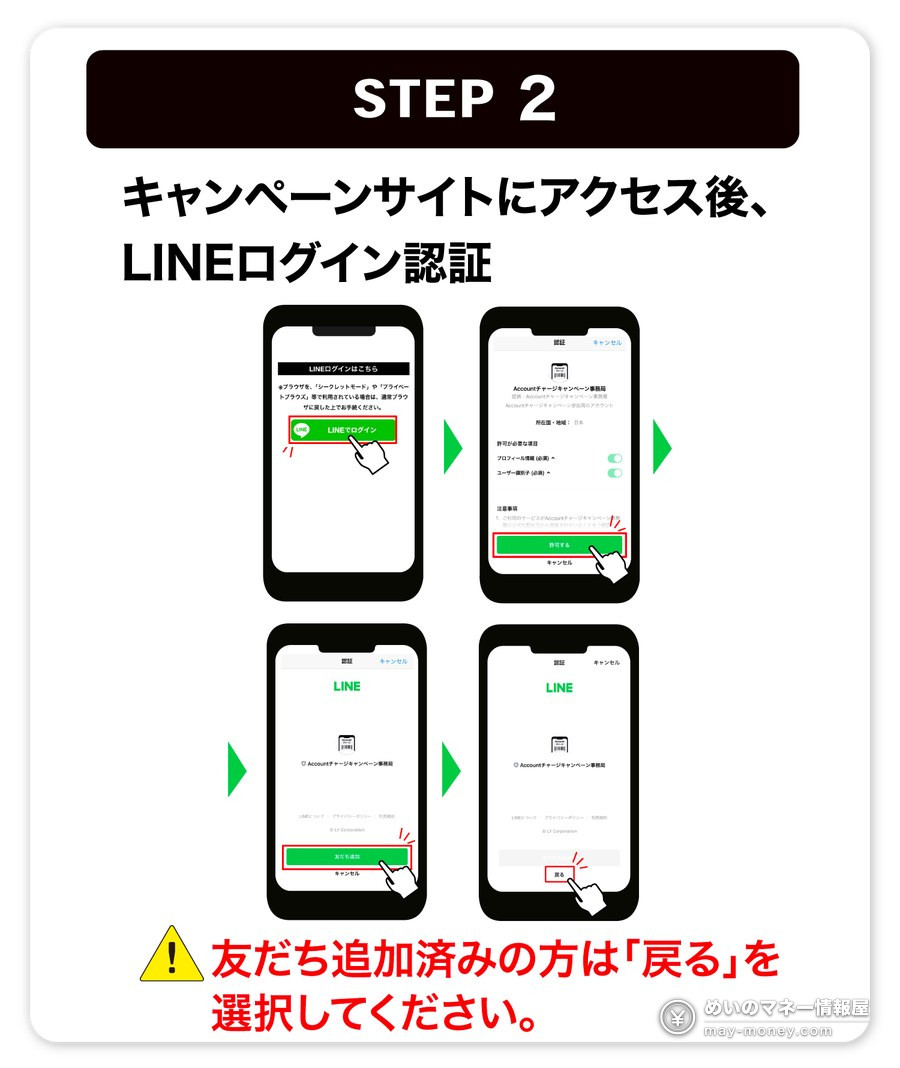
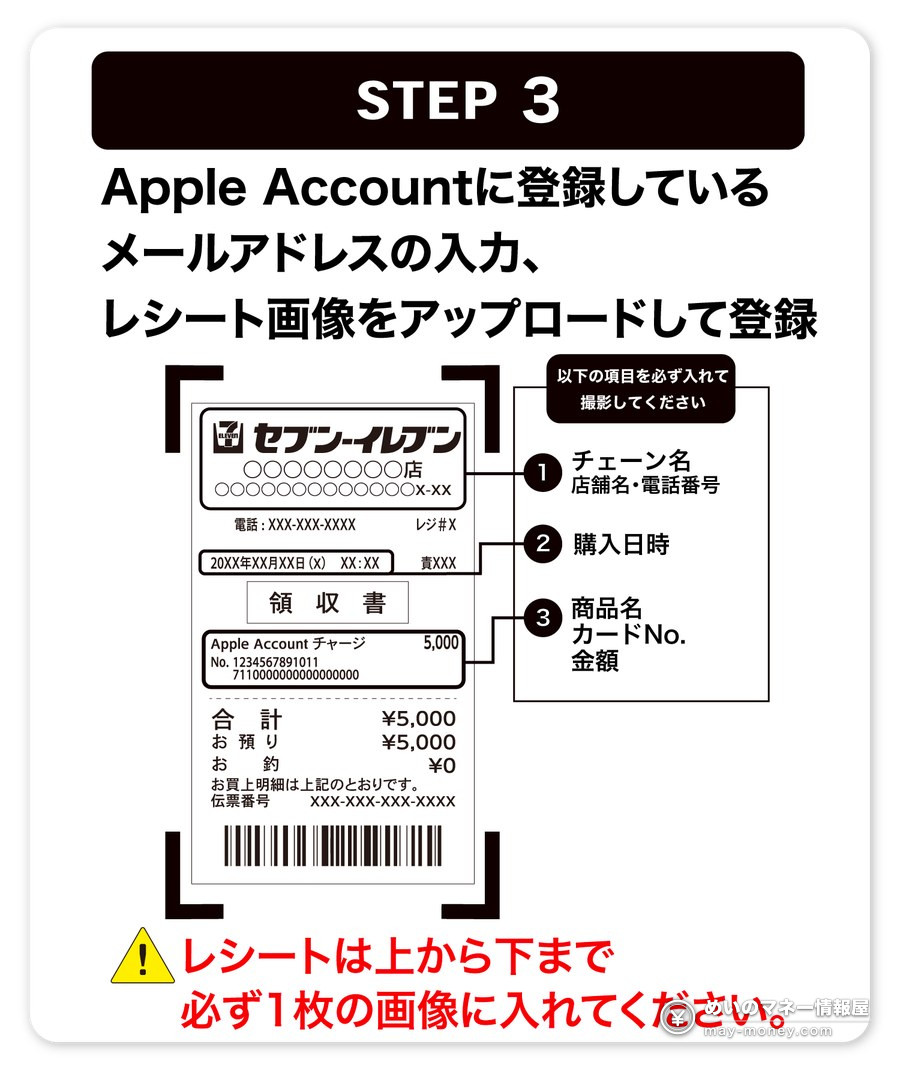
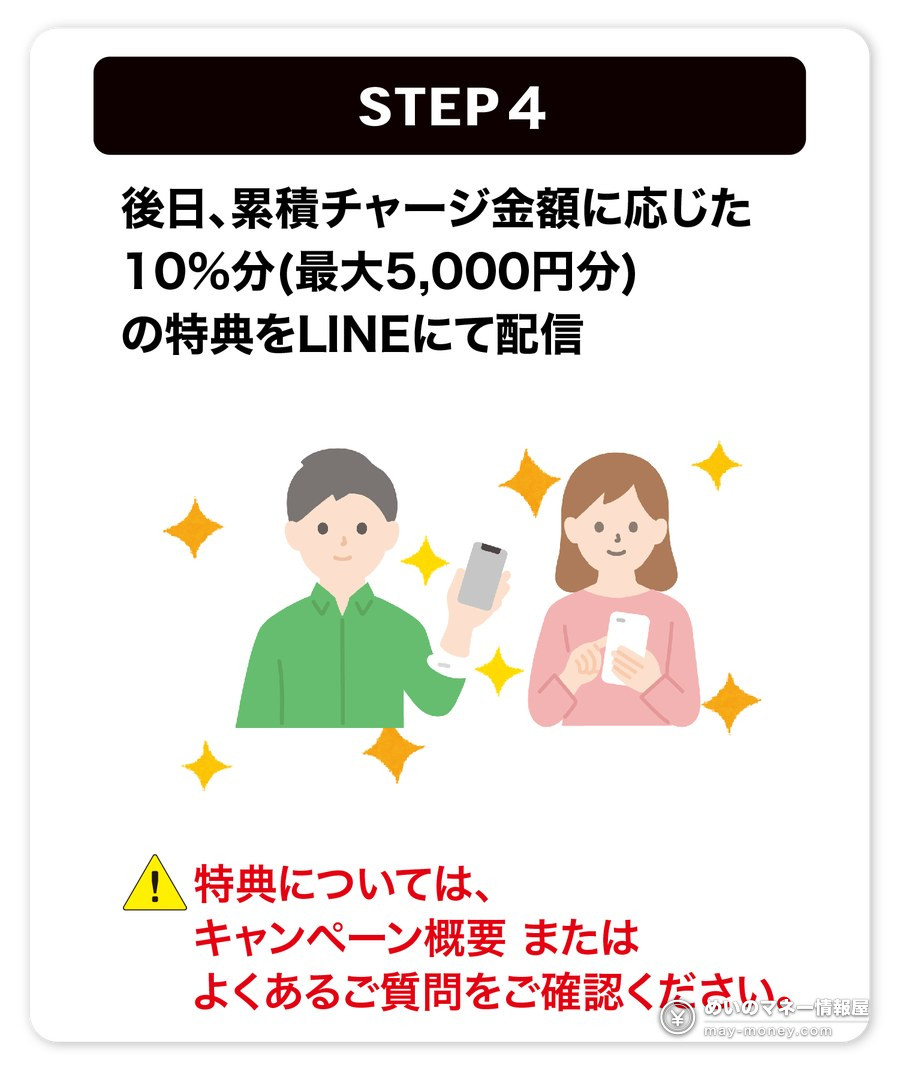
The Wallet side is spelled out in more detail in the official FAQ, in six steps from updating iOS to showing the barcode.
Two deadlines: 8/30 and 8/31
The step people miss isn’t the top-up — it’s the registration in between. It’s easy to assume you’re done once you’ve paid, but you have to submit the receipt yourself.
- Mon 17 Aug, 00:00Eligible period opensOnly top-ups made from this point count; anything earlier doesn’t.
- Sun 30 Aug, 23:59Eligible period closesThe pages state it explicitly: a top-up made on 31 August does not qualify.
- Mon 31 Aug, 23:59Registration deadline — the one people missAdding the LINE account, entering your email and uploading the receipt all have to be done by now. The pages warn that traffic spikes just before the close, and that too many failed attempts locks you out for a while, so don’t leave it to the last hour.
- Wed 30 SepApple Gift Card code sent via LINEDon’t block that LINE account before it arrives, and don’t change your LINE account details — either one takes you out of the delivery list, and codes are never re-sent.
- Wed 14 Oct, 17:00Deadline for chasing a missing codeIf nothing has arrived after 30 September, contact the campaign desk by this time. Keep the receipt until the code is in your hands.
Six places people trip up
- Cards from the rack don’t count
Only “top up the Apple Account at the register” qualifies. Buying a physical Apple Gift Card earns nothing here, and all four chains say so in the most prominent spot on the page. - Two card numbers on one receipt means it won’t upload
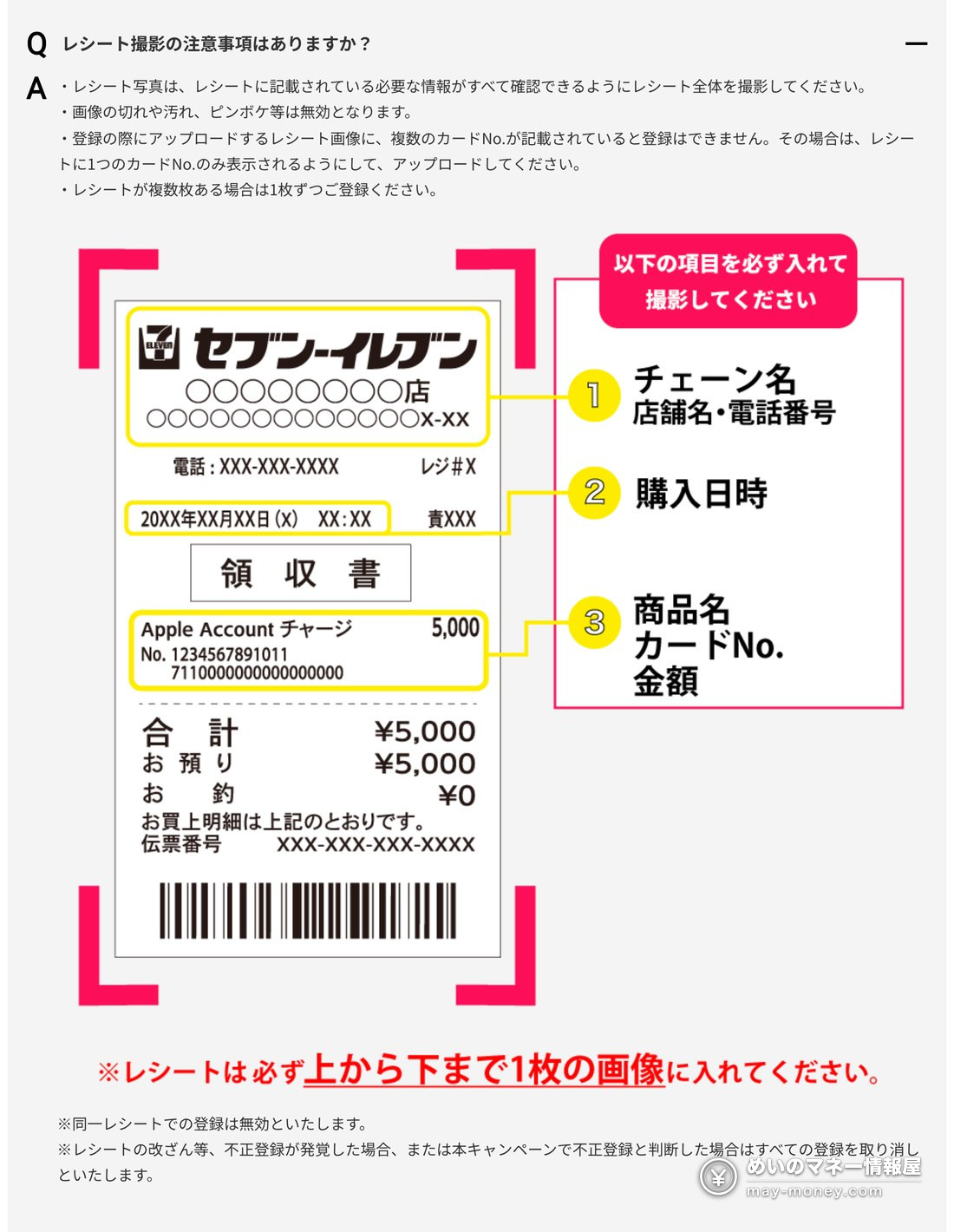
The receipt has to show exactly one card number, so pay separately if you’re buying anything else. Photograph the whole receipt in one frame — cropped, dirty or blurry images are rejected. - Multiple receipts must be registered one at a time
The same receipt can’t be used twice. If you topped up on three visits, that’s three registrations. - Use the email address on your Apple Account
The pages advise against disposable addresses, addresses containing “+” or “-“, and some overseas domains. Make sure mail fromvdpro.jpcan reach you. - One person = one iPhone + one Apple Account
Multiple accounts or devices within the same campaign don’t count. The Apple Account balance itself is capped too, and top-ups fail once you’re over it. - Top-ups can’t be cancelled or refunded
Stated outright on the pages. The balance also can’t be used to buy gift cards, so decide what you’ll spend it on before loading up to the cap.
The receipt rules get their own diagram in the FAQ, showing the three things that must be visible.
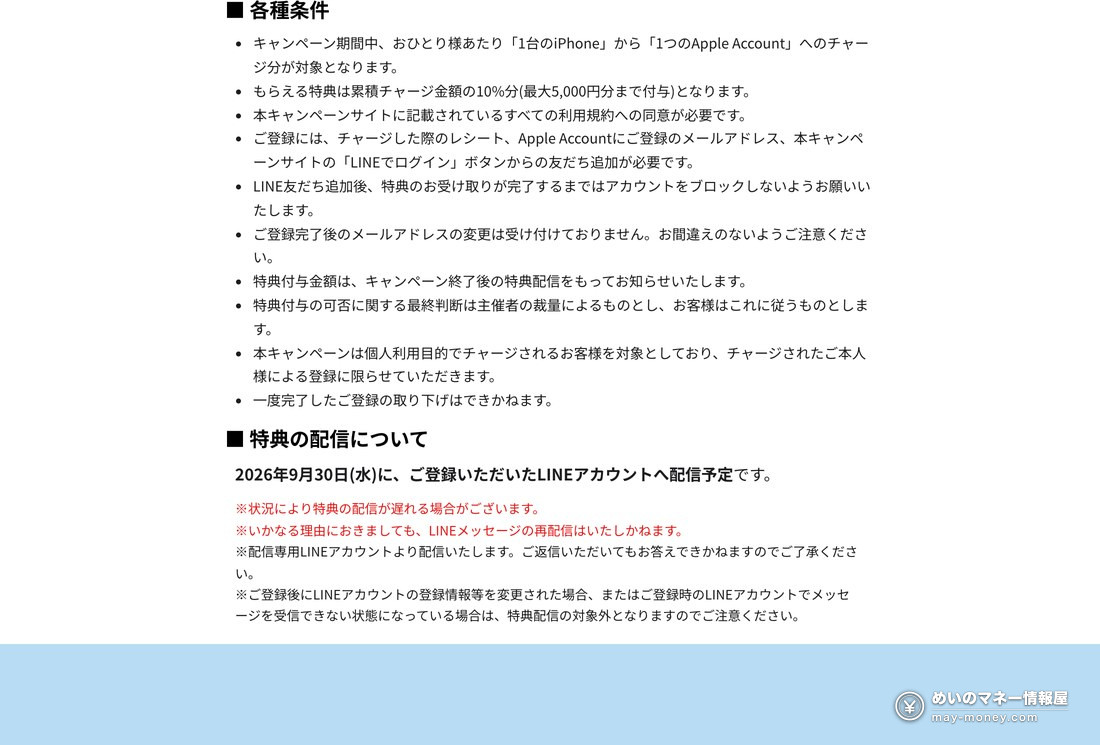
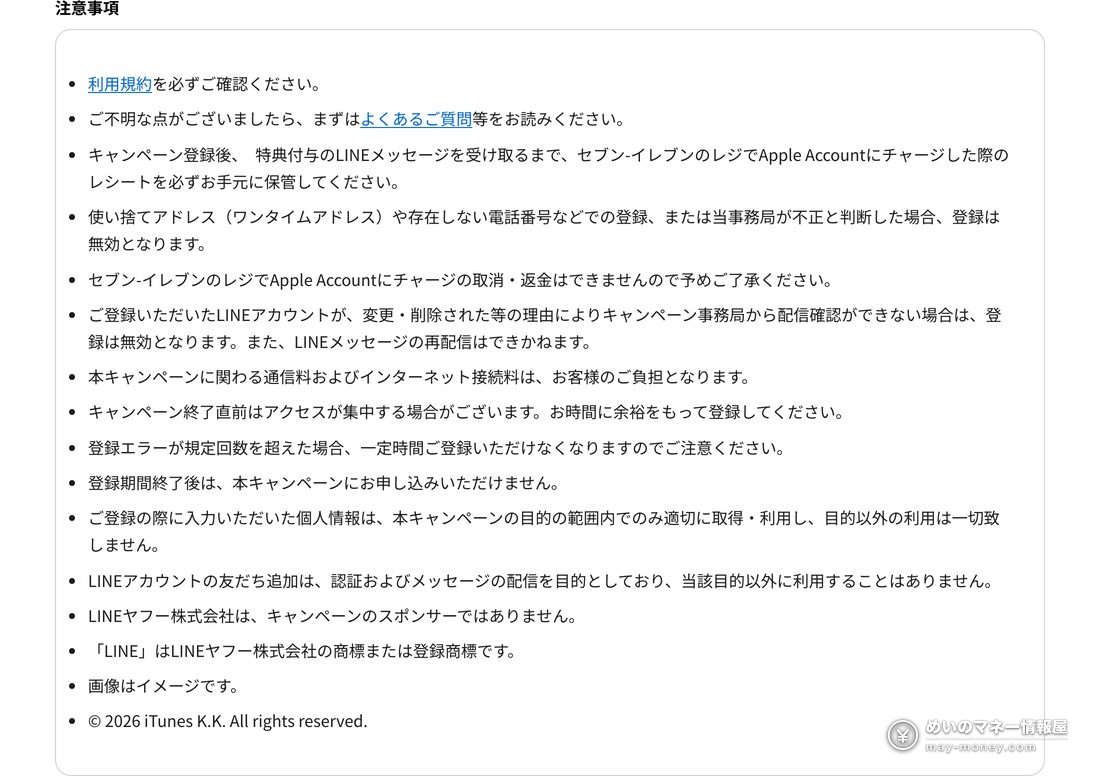
There’s also a full notes block at the bottom of each page. Here it is in the original.
Two campaigns you can stack on top
7-Eleven and FamilyMart are each running a prepaid-card campaign over the same dates, and register top-ups to Apple Account count for those too — so a single top-up can enter both.
7-Eleven: the Erabel Point lottery (えらべるポイント)
From 3 to 30 August, buying eligible prepaid cards or services and entering gets you a shot at Erabel Points (redeemable as PayPay points or d points). Every ¥1,000 in cumulative spend is one entry; first prize is ¥10,000 and second prize is ¥100. Entries are drawn instantly, and applying in blocks of ten guarantees the second prize — ten individual entries do not. Points arrive around late October.
FamilyMart: the FamiMa Point split pool (ファミマポイント山分け)
From 17 to 30 August, show the FamiPay app, buy ¥5,000 or more of eligible prepaid cards and enter, and you share in a ¥10 million pool of FamiMa Points (¥5,000 = one entry). You’ll need FamiPay for it — the FamiPay guide covers setting it up along with the everyday earning routes.
What the balance can actually buy
Before committing, it’s worth checking what the balance is good for. Per Apple’s own documentation, Apple Account balance covers:
- Apps, games and in-app purchases on the App Store
- Music and video from the iTunes Store, the Apple TV app and Apple Books
- Subscriptions such as Apple Music, Apple Arcade, Apple TV and iCloud+
- Products and accessories on apple.com, in Apple Store locations and in the Apple Store app (Japan is an eligible region)
So it isn’t limited to app purchases — you can put it towards an iPhone, an iPad or accessories. What you can’t do is buy gift cards with it, and monthly charges like AppleCare+ sometimes can’t be started from balance alone. If you have a steady monthly subscription bill, this is an easy balance to use up.
If you already run a few earning routes, pairing one-off campaigns like this with your standing setup saves a lot of fiddling. The basics are in the point-site primer, and the current sales across the major Japanese marketplaces are collected in the Mottoku guide.
Frequently asked questions
- Q. Do the Apple Gift Cards sold in store count?
- No. All four campaign pages state that buying an in-store Apple Gift Card is excluded. Only topping up your Apple Account directly at the register qualifies.
- Q. Can I take part with an Android phone?
- No. You need an iPhone on iOS 17 or later with Apple Account added to Wallet in advance, because that’s where the barcode you show at the register comes from.
- Q. Can I pay for the top-up with a credit card?
- None of the four list credit cards as a payment method. Their own service pages say: 7-Eleven, cash or nanaco; FamilyMart, cash or FamiPay; Ministop, cash or WAON; Lawson, cash. To get card rewards into the picture you have to load nanaco, WAON or FamiPay with the card first, then pay with that.
- Q. Which of the four gives the highest return?
- The campaign itself pays 10% at all four; the difference comes from the payment method and how you load that e-money. As of 17 August 2026 the maths works out at up to 13% for 7-Eleven and Ministop, up to 10.5% for FamilyMart, and 10% for Lawson, whose register is cash-only. 7-Eleven means loading au PAY from a credit card (up to 2%), moving it to nanaco via Apple Pay, and adding 1% from the Erabel Point lottery. Ministop means loading WAON from a debit card via Apple Pay (up to 2%) plus 1% for paying with WAON in store. Without those upstream cards, all four are simply 10%.
- Q. Can I pay with nanaco or WAON at Lawson?
- No. Lawson’s service page only says the Apple Account balance can be topped up with cash, and lists no e-money. To stack e-money rewards you need 7-Eleven (nanaco), FamilyMart (FamiPay) or Ministop (WAON).
- Q. Can I take part at all four chains?
- They are four separate campaigns with separate conditions, deadlines and registration pages, and the cap is counted per chain. If you do more than one, submit each receipt on that chain’s own registration page.
- Q. Do I have to load the full ¥50,000 at once?
- No. Top-ups at the same chain are added together across the period, so several smaller visits are fine as long as the total reaches ¥5,000. Each receipt still has to be registered individually.
- Q. When does the Apple Gift Card arrive?
- 30 September 2026, as a message to the LINE account you registered with. It does not come by email. Don’t block that account or change your LINE account details before it arrives.
- Q. What if I forget to register?
- The registration deadline is 23:59 on 31 August 2026, and late registrations aren’t accepted. A top-up made on 31 August also doesn’t qualify.
- Q. Does the code expire?
- The official FAQ says there is no expiry on either redeeming or spending it. If nothing has arrived after 30 September, contact the campaign desk by 17:00 on 14 October 2026.
7-ElevenGo to registration →FamilyMartGo to registration →LawsonGo to registration →MinistopGo to registration →All four are the chains’ official campaign sites (vdpro.jp). Registration closes at 23:59 on 31 August.
Payment methods come from each chain’s own service page: 7-Eleven, FamilyMart, Ministop, Lawson.
Campaign terms, participating stores and e-money reward rates can all change. Check the official pages before taking part.