How to use Kaitori X: compare before you sell
Promotional giveaways, lottery prizes, accidental double purchases: selling a new, unopened item to one buyback (kaitori) shop rather than another can make a difference of several thousand yen. Kaitori X lists prices from 68 shops side by side, works out your take-home amount and shows how quickly other sellers were actually paid. The site is in Japanese, so this guide walks through it screen by screen.
Key points
- Kaitori X compares buyback prices for new and unused items only. It doesn’t buy anything itself, and shops are ranked purely by price.
- Search by product name, JAN code (the number under the barcode) or ASIN, or scan a barcode with your phone camera.
- Each product page lists every shop from highest to lowest, with the buyback rate, conditions and update time.
- Selling several items? “Matome hikaku” works out your take-home after shipping and transfer fees and how many shops to split between.
- Before choosing a shop, check “Payout reports”: anonymous reports of how many days payment took and whether the price was cut.
- Searching needs no account; JAN batch search, synced favorites and alerts need a free login.
- Even selling new, sealed items counts as a “secondhand goods” transaction: shops must check your ID by law (a residence card works), and for mail-in sales, shops verify ID by methods such as restricted-delivery mail.
- Selling your own used belongings is generally not taxable, but profit from buying new items to resell is miscellaneous income; employees with over ¥200,000 of such income a year must file a return.
- What Kaitori X is
- Find a product and compare prices
- Selling several items: compare take-home totals
- JAN batch search: up to 100 at once
- Check payout reports before choosing a shop
- Browser extension: buyback prices on shopping pages
- Other useful features
- Before you sell
- In-store vs mail-in selling
- Why new items still need ID: the Secondhand Articles Dealer Act
- Mail-in sales: the usual ways ID is checked
- Is the money you get taxed?
- Save when you buy, too: points and credit cards
- FAQ
- Sources
What Kaitori X is
Kaitori X is a free site that compares buyback prices for new and unused items across Japanese shops. It collects each shop’s published prices automatically and groups the same product by JAN code and model number.
- 68 shops and about 296,000 products (as of November 19, 2026).
- Kaitori X doesn’t buy items itself, so shops are ranked only by price; there’s no paid placement.
- Update frequency varies by shop, from every few minutes to about once a day; the product page shows each shop’s last update.
- Prices are stored daily, and product pages show up to 180 days of history.
Find a product and compare prices
Type a product name, JAN code or ASIN into the search box at the top of the home page, or tap the button on the right to scan a barcode with your phone. The 13-digit JAN code under the barcode on the box is the most accurate.
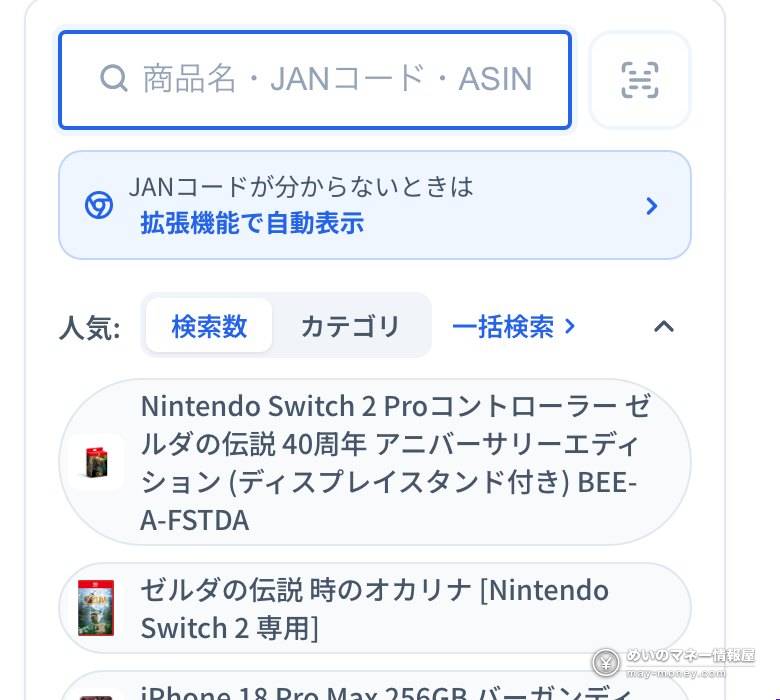
- Add capacity, color or generation to narrow results (e.g. “iPhone 17 256GB”).
- No JAN code? Use the 10-character ASIN after “/dp/” in an Amazon URL.
Reading a product page
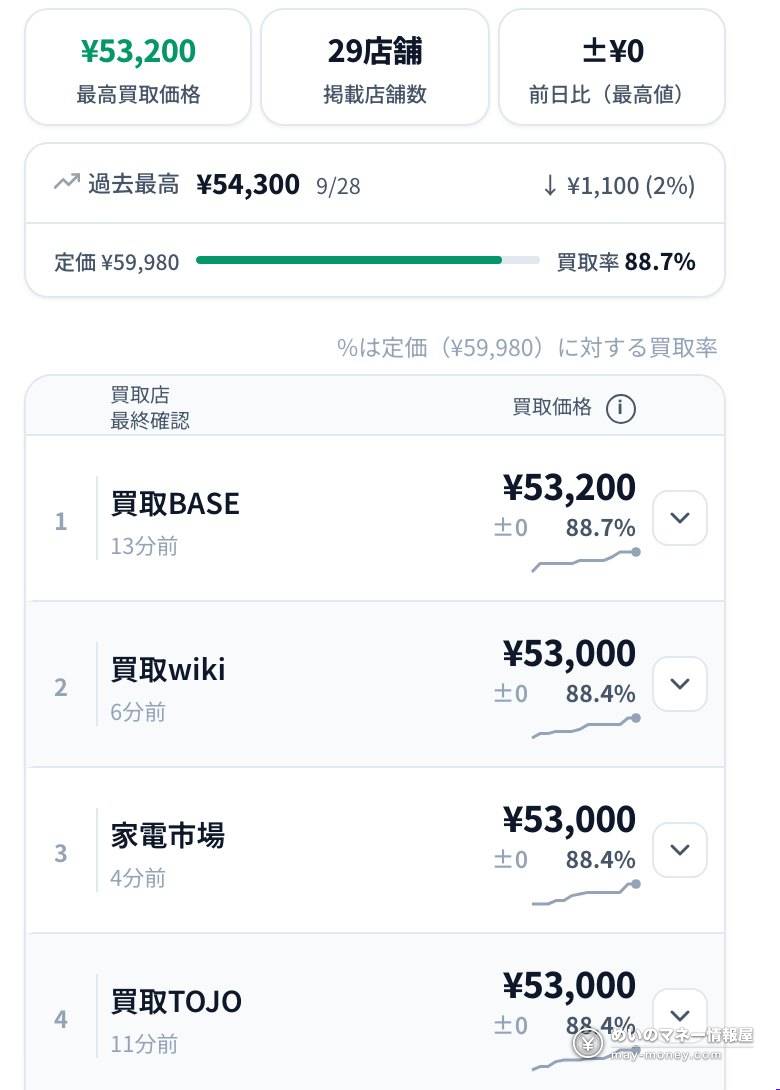
- At the top: the current highest buyback price, how many shops are offering, and the change from yesterday.
- Below: shops in order from highest to lowest price.
- Where the list price is known, the buyback rate (price ÷ list price) is shown.
- Each shop shows when it last updated (e.g. “13分前” = 13 minutes ago) and conditions such as closed today or minimum quantities.
- Tap “確認” on a row to go to that shop’s page and apply there.
Check the trend before selling
The chart shows each shop’s price for up to 180 days. A badge below says whether today’s level is above the past average (高値圏), below it (安値圏) or normal. It compares with the past; it doesn’t predict where prices go next.
Selling several items: compare take-home totals
Sending each item to its top-paying shop can mean paying shipping several times and losing transfer fees. The bulk comparison (まとめ比較) includes those costs.
- Add itemsTap “まとめに追加” on a product page, or search on the まとめ比較 page (up to 50 items).
- Set quantitiesAdjust them under “対象商品”.
- See resultsTotals per shop; the amount on each button is your take-home after shipping and transfer fees.
- It compares selling to 1–3 shops and can widen to as many as 11; the left-most option, 手取り最大, is the split that leaves you the most with no limit on shops.
- Taking items to a store yourself? Choose 店頭に持ち込む to compare only shops that buy in person, without shipping costs.
- You can save the result as a link and open it on your phone or another browser.
JAN batch search: up to 100 at once
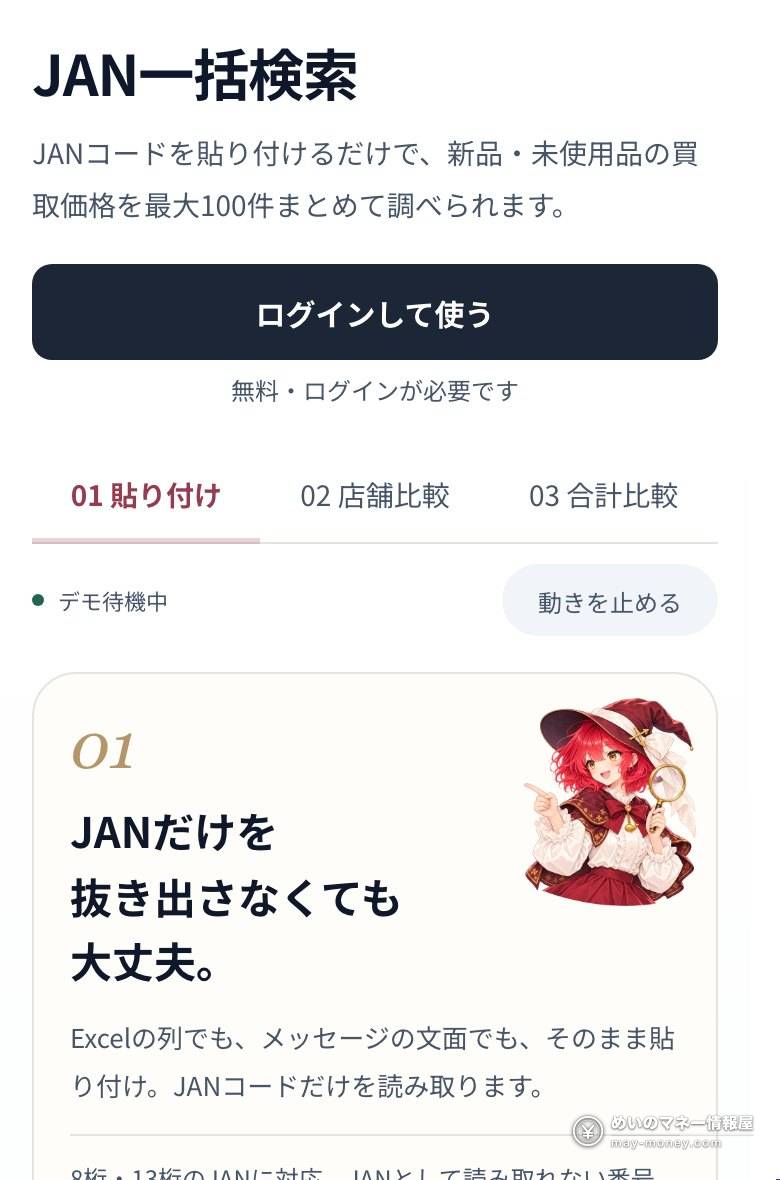
- JAN batch search is free with a login and handles up to 100 codes at a time.
- No need to extract the codes: paste a spreadsheet column or a chat message as-is, and it picks out the JAN codes (8 or 13 digits).
- Results show each item’s top price, the shop and the daily change, and can be added to the bulk comparison in one go.
Check payout reports before choosing a shop
The top-paying shop isn’t a good deal if it pays late or often cuts the price. Payout reports (入金共有) collects anonymous reports from people who actually sold: days until payment, whether the price was reduced, and satisfaction.
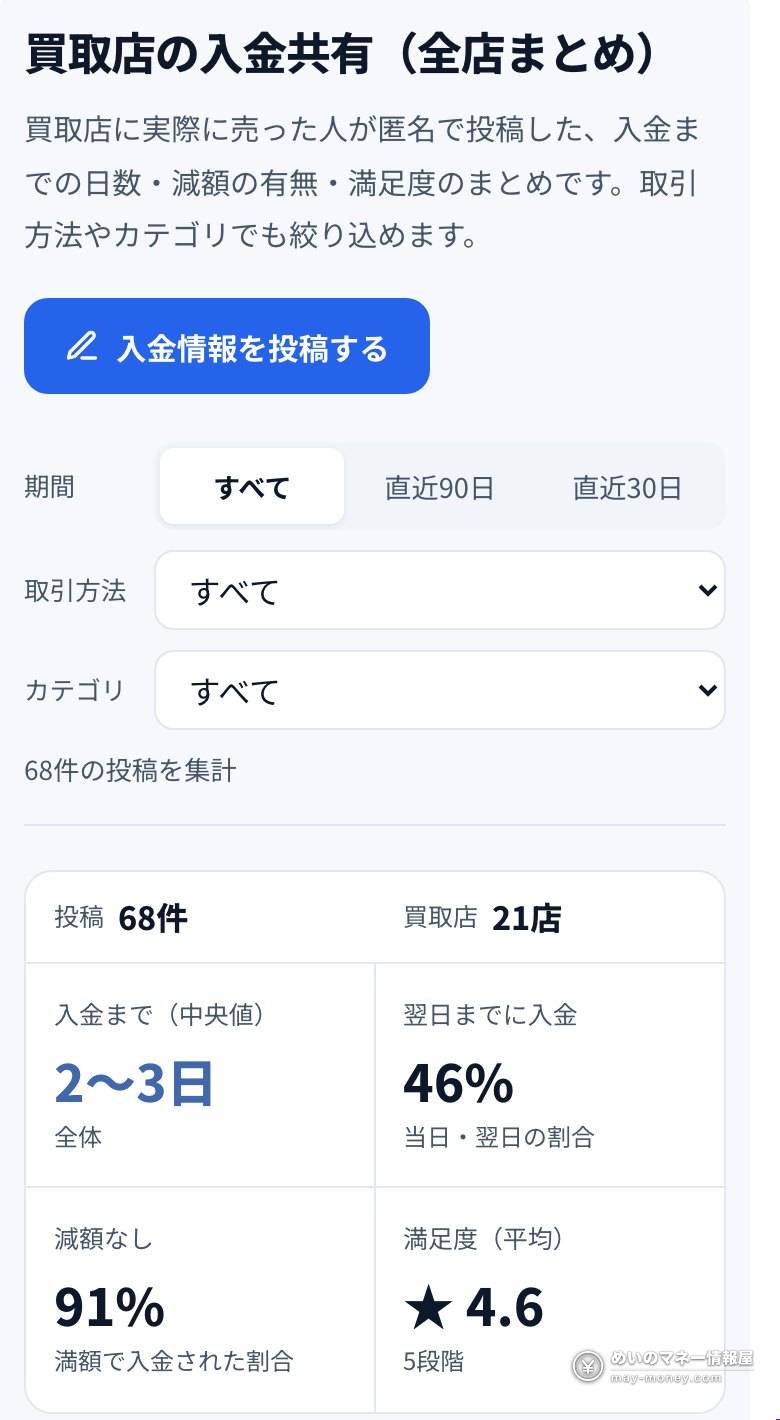
As of November 19, 2026: 68 reports covering 21 shops. The median time to payment was 2–3 days, 46% were paid by the next day, 91% had no price reduction, and average satisfaction was 4.6 out of 5. Shops with fewer than 3 reports are shown for reference only. You can filter by mail-in, in-store or pickup and by category.
Browser extension: buyback prices on shopping pages
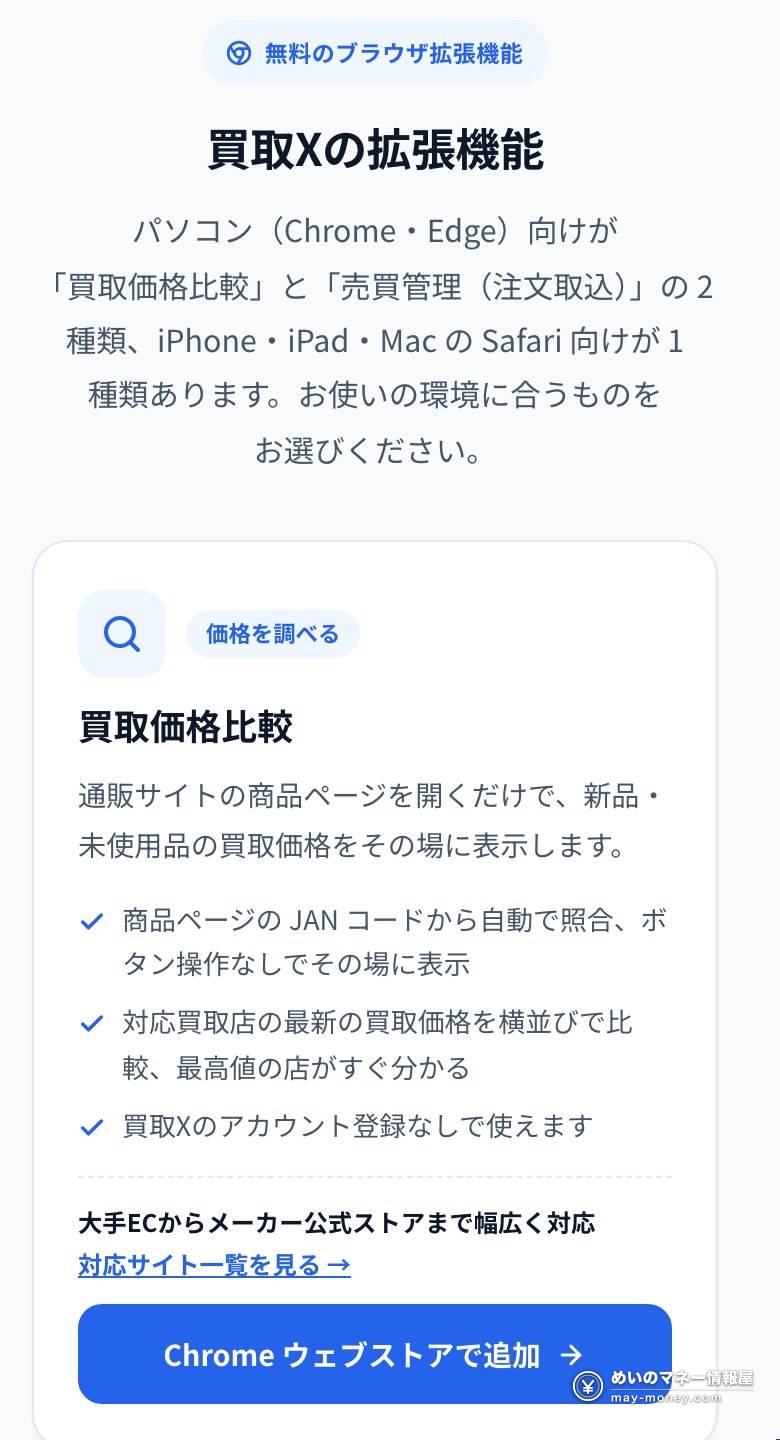
| Where | How to install | Notes |
|---|---|---|
| Chrome or Edge on a computer | Add “買取価格比較” from the Chrome Web Store | No account needed; prices appear on product pages at Amazon, Rakuten, Yahoo! Shopping, electronics chains and more |
| Safari on iPhone, iPad or Mac | Use the free app “Userscripts” and follow the 6-step guide | Safari only; it doesn’t work inside the Amazon app |
See the extensions page for details.
Other useful features
Lottery sales
Open, upcoming and awaiting-results lottery sales on one page, with deadline reminders.
Apple Store stock
In-store iPhone stock at Apple Stores in Japan, updated as often as every 3 minutes.
Restock and buyback price alerts
With a free login, get notified on Discord and elsewhere when an item is restocked or its buyback price hits your target.
Buyback checker
Models laid out by capacity and color with top prices and daily changes, e.g. iPhone.
Before you sell
- Prices are what shops publish, not a final quote: whether the item is sealed, box damage, missing accessories and market moves before it arrives all affect the final amount.
- Check shipping, transfer fees, quantity conditions and reduction rules on the shop’s page before applying.
- Prepare ID (such as your residence card) and a bank account as each shop requires.
- Kaitori X only compares; the sale itself is between you and the shop.
In-store vs mail-in selling
| In store | By mail | |
|---|---|---|
| How | Bring the item and ID to the shop; appraised on the spot | Apply online → pack and ship → the shop inspects and appraises |
| Getting paid | Often cash on the spot | Bank transfer after you accept the offer; days to payment vary, so check payout reports |
| Best for | A shop nearby and you want cash today | No shop nearby, many items, or a higher-paying shop far away |
| Watch out for | Travel cost and time | Who pays shipping and transfer fees, and price moves while in transit |
After Kaitori X shows the highest price, check on that shop’s page whether it takes in-store or mail-in sales, and its current conditions.
Why new items still need ID: the Secondhand Articles Dealer Act
Under the Act, “secondhand goods” include not only used items but also “unused items that have been traded for use”: in other words, something you bought in a shop and never opened. So buyback shops check the seller’s ID by law even for new items.
| Situation | How ID is checked |
|---|---|
| In store | Show your residence card, driving licence, My Number card or similar |
| Mail-in and other non-face-to-face sales | The shop picks a method set by law, such as sending restricted-delivery mail only you can receive, or asking you to send a copy of your residence record; it varies by shop |
| Under ¥10,000 | Normally no check, except for home video game software, CDs/DVDs, books, motorcycle parts and some other items, which always need it |
Match your residence card
Use the same name and address as on your ID. If you moved and the address on the back of your residence card was not updated, the check will stall.
Mail-in sales: the usual ways ID is checked
| Method (examples set in law) | What you do |
|---|---|
| Restricted-delivery mail | The shop sends mail that only you can receive by showing ID; once you sign for it, you are verified |
| Photographing your ID in the shop’s app (eKYC) | Photograph your residence card front, back and thickness as instructed; the shop then sends non-forwardable registered mail to your address |
| Sending a copy of your residence record | Send a copy of your residence record (juminhyo); payment then goes to a bank account in the same name as on the record |
| Copies of two IDs | Send clear copies of two IDs (or an ID and a residence record); the shop sends registered mail to your address |
- The shop decides which method it uses and explains it on the application page.
- Payment goes only to an account in your own name. Foreign residents’ account names may be in katakana or the alphabet and differ from the residence card, so check with the shop before applying.
- If you move, update the address on the back of your residence card at the ward office first, or the verification mail will go to your old address.
Is the money you get taxed?
| What you sold | Tax treatment (NTA No.1906) |
|---|---|
| Things from your daily life (clothes, furniture, appliances) | Not taxed; nothing to file |
| New items bought to resell at a profit | Miscellaneous income or similar: count the sale price minus purchase cost, shipping and other expenses |
| Large-scale, ongoing trading | May be business income |
Employees must file a tax return if income other than salary (profit) exceeds ¥200,000 a year (NTA No.1900). See our tax guide for foreign residents for how to file.
Keep records
Keep purchase receipts and sale records (appraisal slips, transfer statements) by item, so you can work out the profit quickly at filing time.
Save when you buy, too: points and credit cards
What you keep after selling depends on what you paid. Anything you save at the buying stage goes straight into the final difference:
- Go through a point site before shopping online to earn extra points on the order;
- pay by credit card or mobile payment to collect their points as well;
- buy when the shop’s point multipliers are high to lower your cost further.
Work out the difference as buyback price − purchase price − shipping and fees. If you buy and sell repeatedly to profit from the gap, report that profit as explained in the previous section.
FAQ
- Q. Is Kaitori X free?
- Searching and comparing are free and need no account. JAN batch search, synced favorites and alerts need a free login; some features such as data downloads have paid plans.
- Q. Does Kaitori X buy items itself?
- No. It only lists shops’ prices, ranked by price.
- Q. The site is in Japanese. Can I still use it?
- Yes. Search by product name, JAN code or ASIN; the JAN code under the barcode is the most reliable.
- Q. Will I definitely get the price shown?
- Not necessarily. The final amount depends on condition and the market when your item arrives, so check the shop’s page before applying.
- Q. Which shop should I sell several items to?
- Use the bulk comparison: it works out take-home after shipping and transfer fees and how many shops to split between.
- Q. How do I know if a shop pays quickly?
- Check payout reports: real sellers’ days to payment, price cuts and satisfaction.
- Q. Can I use the extension on my phone?
- On iPhone, iPad or Mac, Safari works via the free Userscripts app; not inside the Amazon app. On a computer, use Chrome or Edge.
- Q. How many JAN codes can I check at once?
- Up to 100 per batch search, with a free login.
- Q. Can I compare used items?
- No. Kaitori X only covers new and unused items.
- Q. How often are prices updated?
- It depends on the shop, from every few minutes to about once a day; each shop’s update time is on the product page.
- Q. Do I need my residence card to sell a sealed new item?
- Yes. A new item that has already been bought and sold counts as secondhand goods by law, so the shop checks your ID. A residence card is fine.
- Q. How is ID checked for mail-in sales?
- By a method set in law, such as restricted-delivery mail or sending a copy of your residence record; see each shop’s instructions.
- Q. Is profit from selling new items to a buyback shop taxed?
- Not if they were things you used yourself. Profit on items bought to resell is miscellaneous income or similar; employees with over ¥200,000 of such income a year must file a return.
- Q. Can the payment for a mail-in sale go to a family member’s account?
- No. One of the methods set in law is paying into an account in the same name as the residence record, and shops normally pay only into the seller’s own account.
Related
- Saving Money in Japan: A Roadmap for Foreign Residents
- Japan Taxes for Foreign Residents: Year-End Adjustment Guide
- Point Sites for Foreigners in Japan: How to Earn & Cash Out
- Credit Cards in Japan for Foreigners: Which One to Get First
- International Students in Japan: Work, Tax and Pension
Sources
Pages below were checked and screenshots taken on November 19, 2026.
- Kaitori X: About
- Kaitori X: User guide
- Kaitori X: Payout reports
- Kaitori X: JAN batch search
- Kaitori X: Browser extensions
- e-Gov: Secondhand Articles Dealer Act (Japanese)
- e-Gov: Enforcement rules of the Act, Articles 15–16 (Japanese)
- NTA No.1906: Side income from online sales
- NTA No.1900: Employees who must file
Related Articles


Get new articles by email
We will email you when a new deals article goes up. You can choose the categories, too.