Last updated: (rechecked after teppay launched and the campaign started, against the official campaign page, FAQ and the November 4 notice)
If you live in Japan and use Suica, there’s a new payment option in your phone. teppay is JR East’s own QR code payment service, and it has lived inside the Mobile Suica app since October 20.
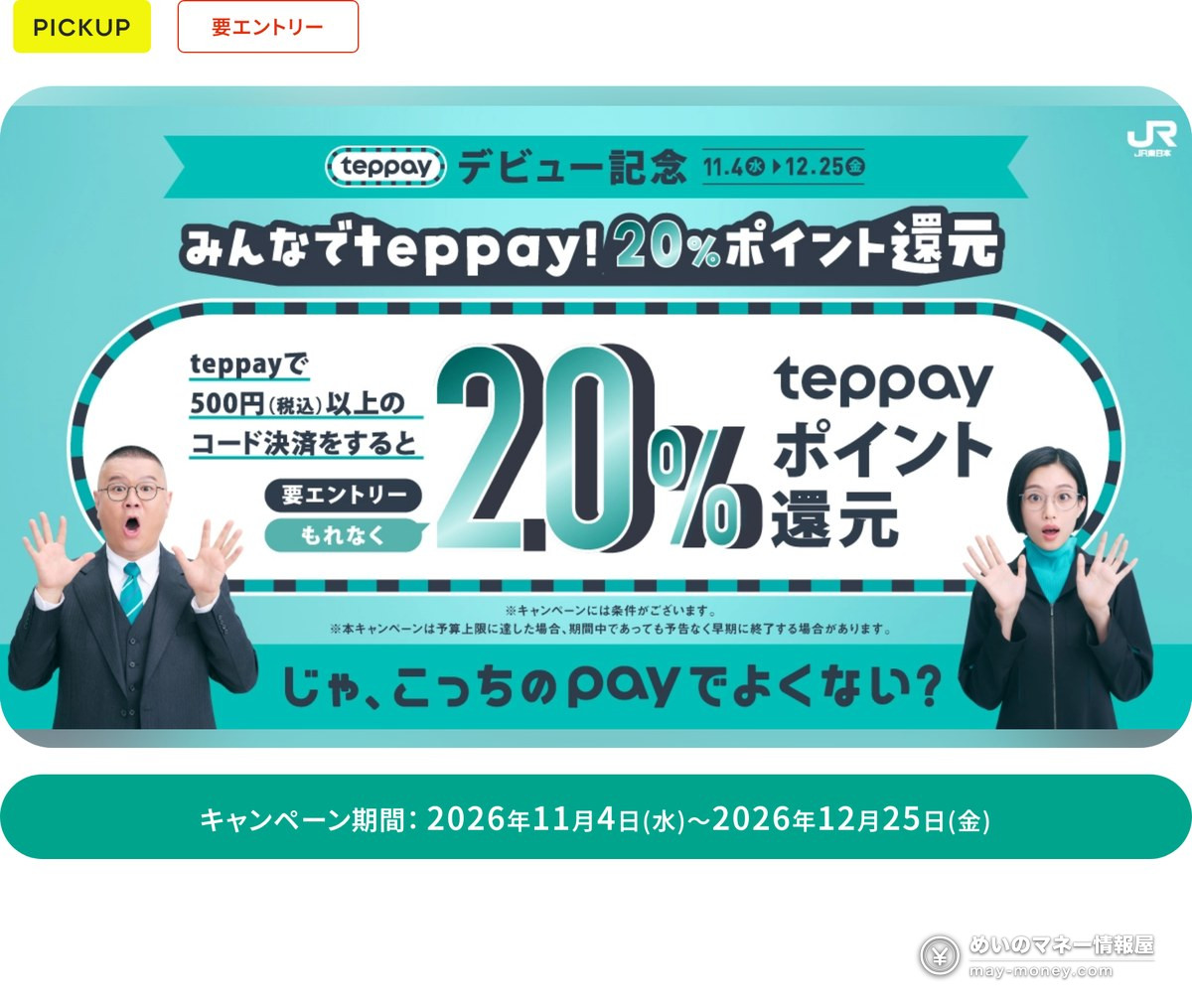
To mark the launch, JR East is running “Minna de teppay! 20% Point Rewards” from November 4 to December 25, 2026. Enter the campaign, pay ¥500 or more with teppay, and you get 20% back in teppay points, up to 5,000 points per person. It works at Smart Code merchants all over Japan, not just in the Tokyo area, so convenience stores, drugstores and restaurants are all fair game.
The rules are short, but it’s easy to miss points by paying before you enter or splitting purchases under ¥500. Here’s everything you need, including how to top up without a Japanese credit card.
- Period
- Wed, Nov 4 – Fri, Dec 25, 2026
- Reward
- 20% of what you pay, as limited-time teppay points. Not a lottery
- Cap
- 5,000 points per person (reached at ¥25,000 in total spending)
- How
- Enter first, then pay ¥500+ (tax incl.) per transaction by teppay code payment at eligible stores
- Points arrive
- 7 business days after each payment
- Excluded
- Topping up Suica; buying Mobile Suica commuter passes, discount tickets or Green Car tickets; payments with the teppay JCB prepaid card
- Heads-up
- May end early without notice once the budget runs out
- The 20% campaign started on November 4. As of November 5 the official page shows no early-end notice. If you haven’t entered yet, enter before you pay.
- Bank top-ups need an ID check, and only a My Number Card is accepted (no residence card, passport or driver’s license). Without one, top up with cash at an ATM or with a View Card (details).
- On November 4 teppay published spending limits: without the ID check, View Card linked payment is capped at ¥20,000 per payment and ¥50,000 a month (details).
- Added the official terms of the NewDays 5% off coupon and Bic Camera’s extra 4% (details).
- What is teppay? How it differs from Suica
- How much you get: ¥25,000 hits the cap
- How to enter (5 steps)
- Topping up: methods and limits
- Balance payment vs. View Card linked payment
- Where you can use it
- Tips to get the full 5,000 points
- Other teppay campaigns: NewDays, Bic Camera, JRE BANK
- When you won’t get points
- FAQ
What is teppay? How it differs from Suica
teppay is a QR/barcode payment service from JR East that began rolling out at 11:00 on Tuesday, October 20, 2026. It isn’t a separate app. Update the Mobile Suica app (about 45 million Mobile Suica cards have been issued) to the latest version, and you can start using it once you accept the updated terms.
It works like PayPay: tell the cashier you’re paying with teppay (“teppay de”) and show a barcode, or scan the store’s QR code. It doesn’t work offline, so your phone needs a connection. Compared with tapping Suica:
| Suica (transit IC) | teppay (code payment) | |
|---|---|---|
| How you pay | Tap | Show a barcode / scan the store’s QR |
| Balance limit | ¥20,000 | Up to ¥300,000 after My Number Card ID check |
| Where | About 2.35 million transit IC merchants | teppay merchants + 1.7 million+ Smart Code locations |
| Trains | Tap through the gates | Not directly; move the balance to Suica first |
| Usual points | Depends on the store/card | Balance: 0.5% teppay points View Card linked: 1% JRE POINT |
You can also send teppay balance to other users, top up Suica with it, or buy commuter passes (but Suica balance can’t be moved back into teppay). Mobile PASMO is scheduled to join in spring 2027. One catch: stores that take Suica and stores that take teppay are two different lists, so tapping Suica somewhere doesn’t mean teppay works there.
How much you get: ¥25,000 hits the cap
At 20% with a 5,000-point cap, ¥25,000 in total spending gets you the maximum. The official wording is “morenaku,” meaning everyone who meets the conditions gets the points.
| Total paid during the campaign | teppay points back |
|---|---|
| ¥2,500 | 500 points |
| ¥10,000 | 2,000 points |
| ¥25,000 | 5,000 points (cap) |
| ¥40,000 | 5,000 points (nothing extra) |
Each payment has to be ¥500 or more, tax included. A ¥200 drink at a convenience store won’t count, so bundle small purchases.
How to enter (5 steps)
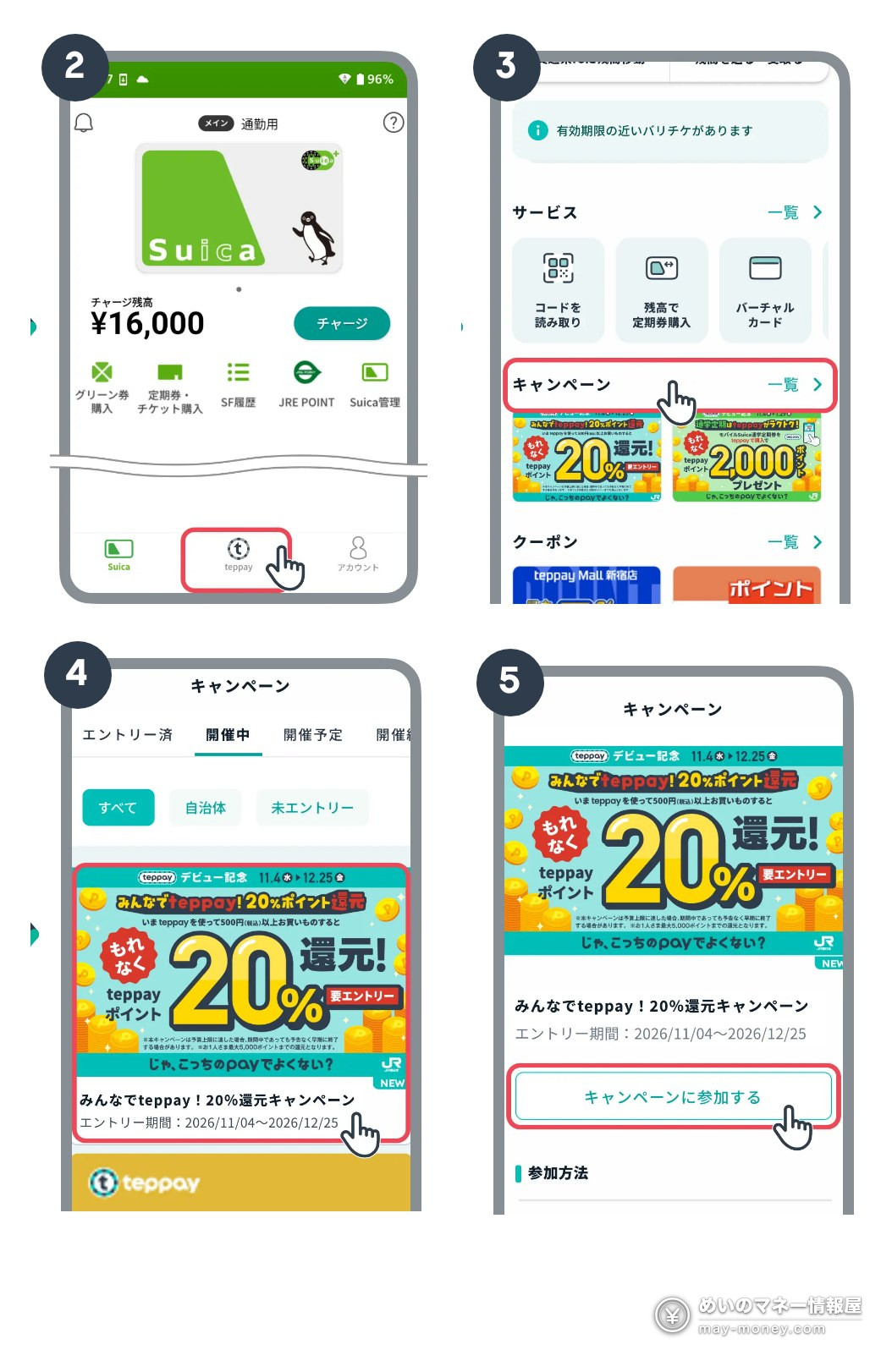
You don’t enter on a website. Entry happens in the teppay screen of the Mobile Suica app. The rules say you must enter before paying, so payments made before entry don’t count. The app shows the entry period as 2026/11/04–12/25.
- Log in to Mobile SuicaOpen the Mobile Suica app and log in (you need a Mobile Suica membership).
- Switch to teppayTap the teppay icon at the bottom of the screen.
- Open “Campaign”On the teppay home screen, tap “キャンペーン” (Campaign) near the bottom.
- Pick this campaignTap the “みんなでteppay!20%還元” banner.
- EnterTap “キャンペーンに参加する” (Join the campaign). Pay with teppay only after this.
The campaign requires you to download the Mobile Suica app and register as a member. If your Suica lives only in Apple Wallet, set up the app before you enter.
Topping up: methods and limits
teppay is prepaid (except View Card linked payment, covered in the next section). There are four ways to add money, and all are free of charge:
- Bank account: about 600 institutions, including Mizuho, MUFG, SMBC, Japan Post Bank, Rakuten Bank and JRE BANK
- Cash: Seven Bank ATMs and Lawson Bank ATMs (not station ticket machines or VIEW ALTTE)
- Credit card: View Card only (View Cards with the “ii” mark and corporate cards are excluded). Other issuers’ cards can’t be used
- Balance sent to you by another user
No Japanese credit card? Cash at a Seven Bank or Lawson Bank ATM works. JRE POINT can’t be converted into teppay balance. Every top-up method requires SMS verification first, so if your phone has a data-only SIM, you’ll need a number that can receive texts.
Before you can register a bank account, teppay asks for an ID check (eKYC), and the only accepted document is a physical My Number Card with a signature certificate, read through its IC chip with your phone. Residence cards, passports and driver’s licenses are not accepted. If you don’t have a My Number Card, top up with cash at a Seven Bank or Lawson Bank ATM or with a View Card; neither needs the ID check.
Here are the official top-up limits. Even without the ID check, an ATM takes up to ¥50,000 at a time, so the ¥25,000 this campaign needs fits in one go:
| Method | No ID check | ID checked (eKYC) |
|---|---|---|
| Bank account | ¥50k per top-up / ¥100k per day ¥100k per month* | ¥100k per top-up / ¥150k per day ¥300k per month |
| ATM (cash) | ¥50k per top-up / ¥50k–100k per day ¥50k–100k per month | ¥100k per top-up / ¥150k per day ¥300k per month |
| Credit card (View Card) | ¥10k–50k per top-up / ¥20k–100k per day ¥50k–100k per month | ¥100k per top-up / ¥150k per day ¥300k per month |
Some banks and card issuers set their own lower limits. *The official table lists bank accounts in the “no ID check” column too, but teppay’s FAQ lists bank top-ups among the services unlocked by the ID check, and registering an account in the app asks you to scan a My Number Card. Sources: teppay FAQ on charge limits per top-up, day and month, and on services available after eKYC.
Balance payment vs. View Card linked payment
teppay can take money from two places:
- teppay balance: pay from money you’ve topped up. Normally earns 0.5% in teppay points.
- View Card linked payment: charge a registered View Card directly, with no top-up needed. With the ID check you can spend up to your card limit; without it, ¥20,000 per payment (see the table below). Normally earns 1% in JRE POINT.
For this 20% campaign, the official condition simply says “code payment with teppay” and doesn’t distinguish between the two. Points-news site Poitan reports that both count. If you don’t have a View Card, paying from your balance is all you need.
On November 4 teppay also posted a notice about spending limits. Payments are capped too, and the caps depend heavily on whether you’ve done the ID check:
| Spending limit | No ID check | ID checked (eKYC) |
|---|---|---|
| Balance payment | ¥10k–100k per payment / ¥20k–100k per day ¥20k–100k per month | ¥300k per payment, day and month |
| View Card linked payment | ¥20k per payment / ¥20k per day ¥50k per month | Up to your card limit |
| Top-up to Mobile Suica | ¥5k–10k per top-up / ¥5k–100k per day ¥5k–100k per month | ¥10k per top-up / ¥300k per day ¥300k per month |
Card issuers may set their own lower limits. Sources: teppay FAQ on spending limits per payment, day and month; teppay notice on spending limits (November 4, 2026).
You get limited-time teppay points worth ¥1 each, which you spend when paying from your teppay balance (points closest to expiring are used first). Limited-time points can’t be exchanged for JRE POINT and can’t be combined with View Card linked payment. Expiry depends on when they’re granted; check under “あなたの残高” (Your balance) in the app.
Where you can use it
teppay works at JR East Group shopping facilities, stores showing the teppay mark, and 1.7 million+ locations nationwide with the Smart Code mark (as of March 2026). A selection from Smart Code’s official list of major merchants:
teppay says some stores are excluded, and this is Smart Code’s list, so not every store on it is guaranteed to count for the campaign. Search the official “Where to use” page, or look for the teppay or Smart Code sign at the register. The full merchant list is on Smart Code’s website.
Tips to get the full 5,000 points
- Enter now if you haven’t. The campaign started on November 4. Payments before entry don’t count, and it can end early if the budget runs out.
- Do the SMS verification and top up first. Without a My Number Card, cash at an ATM is the easiest route. You can also top up at the register if you’re short, but only with a data connection.
- Keep every payment at ¥500 or more. Combine small convenience-store purchases into one.
- Or make one big purchase. The rules don’t mention a per-transaction cap, so paying ¥25,000 in one go at an electronics store that accepts teppay earns 5,000 points, something Suica’s ¥20,000 limit never allowed. Check your own limits first, though: without the ID check, View Card linked payment stops at ¥20,000 per payment, and balance payments have a per-payment cap too.
- Buying electronics? Stack Bic Camera’s bonus. Pay ¥20,000 or more in one go at Bic Camera with teppay linked to a Bic Camera Suica Card (View Card linked payment) and you get an extra 4% in Bic Points, separate from the 20% campaign (terms below).
- Don’t cancel before the points arrive. Leaving teppay or Mobile Suica before points are granted forfeits them, and returned purchases don’t count.
- Use the points. They arrive 7 business days after each payment; check under “サービス一覧 > 利用履歴(取引履歴)” (Services > History). Limited-time points expire.
Other teppay campaigns: NewDays, Bic Camera, JRE BANK
These are running alongside the 20% campaign (checked against teppay’s official campaign list and partners’ pages on November 5). Each has its own conditions, so check the respective campaign page.
| Campaign | Period | What you get |
|---|---|---|
| teppay × NewDays | Oct 20 – Nov 30 | Spend ¥5,000+ (tax incl.) in total with teppay at NewDays / NewDays KIOSK: a NewDays 5% off coupon, usable any number of times from Jan 15 to Mar 31, 2027. No entry needed. The coupon code arrives in teppay’s notices in mid-December; enter it in the NewDays app by Jan 6, 2027 |
| Student commuter passes | Nov 4 – Jan 29, 2027 | Buy or renew a Mobile Suica student pass with teppay balance, or move a student pass from a Suica card to Mobile Suica: 2,000 teppay points (one time, either option). No entry needed for buying; entry required for moving a pass |
| New View Card members | Nov 4 – Jan 31, 2027 | Join View Card Standard (until Jan 16) or Gold, then top up teppay or use linked payment: 10% back in JRE POINT (up to 5,000) |
| 100 million points shared | Nov 4 – Dec 31 | Enter, then top up from View Card plus linked payments totaling ¥20,000+ (tax incl.): share of 100 million JRE POINT |
| Bic Camera × teppay | Nov 4 – Dec 25 | Link a Bic Camera Suica Card to teppay and pay ¥20,000+ (tax incl.) in one go by View Card linked payment at Bic Camera stores or Air BicCamera: an extra 4% in Bic Points (up to 5,000, granted late February 2027). No entry needed. Online stores, Kojima, Sofmap and in-store tenants excluded |
| teppay × JRE BANK | Nov 4 – Mar 25, 2027 | Meet the three conditions below: one JRE BANK discount voucher (40% off) |
Bic Camera’s “up to 35%” headline is teppay’s 20% plus Bic Camera’s own maximum of 15% (for items that normally earn 10%, paid with the Bic Camera Suica Card while showing the official Bic Camera app, among other conditions). Each side has its own 5,000-point cap, and the 20% campaign tops out at ¥25,000 of spending.
For teppay × JRE BANK “Tsunagete Tokutabi,” all three must be true on the judgment date, March 25, 2027:
- Your JRE BANK account is set as teppay’s top-up bank, with at least ¥100,000 in the ordinary deposit account
- A View Card is set as teppay’s payment card, and you’ve made at least one View Card linked payment during the campaign
- JRE POINT link registration (connecting your JRE BANK account to JRE POINT) is complete
The voucher is scheduled for early June 2027 and valid until August 31, 2027. For JRE BANK’s own perks, such as 40% off Shinkansen fares and the Dokokani Byuun discount, see my JRE BANK guide; for earning and using JRE POINT, see the JRE POINT guide.
Enter a referral code when you open the account to get extra JRE POINT (amount and period depend on the referral program running at the time). Here’s mine.
When you won’t get points
- Payments made before you entered
- Payments under ¥500 (tax included)
- Topping up Suica; buying Mobile Suica commuter passes, discount tickets or Green Car tickets
- Payments with the teppay JCB prepaid card (for online shopping)
- Purchases you later return
- Leaving teppay or Mobile Suica before the points are granted
- Payments at excluded stores
The campaign may also end early without notice once its budget is used up. teppay’s official campaign page has the latest terms.
FAQ
- Q. Do I need a new app for teppay?
- No. teppay is a feature of the Mobile Suica app. Update the app to the latest version and accept the new terms to switch to it. If you only use Suica in Apple Wallet and aren’t a Mobile Suica member, you’ll need to download the app and register to join the campaign.
- Q. Do payments made before entering count?
- No. The rules require you to enter first and then pay with teppay. The campaign is already running, so enter before you pay.
- Q. Does a ¥499 payment count?
- No. Each payment must be ¥500 or more, tax included.
- Q. Can I get all 5,000 points with a single ¥25,000 payment?
- The rules give 20% of the amount paid with a cap of 5,000 points per person and don’t mention a per-transaction limit. Paying ¥25,000 at once at a store that accepts teppay earns 5,000 points. Without the ID check, though, View Card linked payment is capped at ¥20,000 per payment, and balance payments have a per-payment cap too.
- Q. Does View Card linked payment count?
- The official condition is code payment with teppay and doesn’t distinguish payment sources; Poitan reports that both balance and linked payments count. Without a View Card, just pay from your balance.
- Q. Can I top up without a View Card?
- Yes. Use cash at Seven Bank and Lawson Bank ATMs, or a bank account at about 600 institutions (registering one requires a My Number Card ID check), with no fees. Credit card top-ups are limited to View Card.
- Q. Do I need the My Number Card ID check to take part?
- No, but without it you can’t top up from a bank account. Use cash at an ATM (up to ¥50,000 at a time) or a View Card instead, which easily covers the ¥25,000 needed for the cap. The ID check only accepts a My Number Card (not a residence card or passport); once done, your balance limit rises to ¥300,000 and View Card linked payment goes up to your card limit.
- Q. When do the points arrive, and what can I use them for?
- Seven business days after each payment. They’re limited-time teppay points worth ¥1 each, usable when paying from your teppay balance. They can’t be exchanged for JRE POINT.
- Q. Can the campaign end early?
- Yes. The official page says it may end without notice during the period once the budget runs out.
- Q. If a store accepts Suica, does it accept teppay?
- Not necessarily. Suica merchants and teppay merchants are separate. Look for the teppay or Smart Code sign at the register, or search the official store finder.
- Q. Can I pay with teppay without a signal?
- No. teppay doesn’t support offline payment, so check that your phone is online before paying in basements or other spots with weak reception.
Sources (checked November 5, 2026)
- teppay: Minna de teppay! 20% Kangen Campaign (Japanese)
- JR East press release, October 6, 2026 (Japanese, PDF)
- teppay FAQ: charge limits / registrable credit cards / point types and expiry
- JRE BANK: teppay × JRE BANK Tsunagete Tokutabi Campaign (Japanese)
- Poitan News, October 6, 2026 (Japanese)
- teppay FAQ: services unlocked by eKYC / ID check for foreign nationals / spending limits
- teppay notice: spending limits (November 4, 2026, Japanese)
- teppay: teppay × NewDays Otoku Pass Campaign (Japanese)
- Bic Camera: Bic Camera Suica × teppay campaign (Japanese)
- ASCII.jp: how to use teppay (Japanese)
Related Articles


Get new articles by email
We will email you when a new deals article goes up. You can choose the categories, too.