with a ¥0 dish rental
Both Home and Roam service plans are half price in Japan. We walked through the official order page to check the numbers and the fine print.
No affiliate links in this article. Prices and terms are as shown on Starlink’s official site on ; we took the order page as far as the summary using the Tokyo Metropolitan Government Building’s address and did not buy anything.
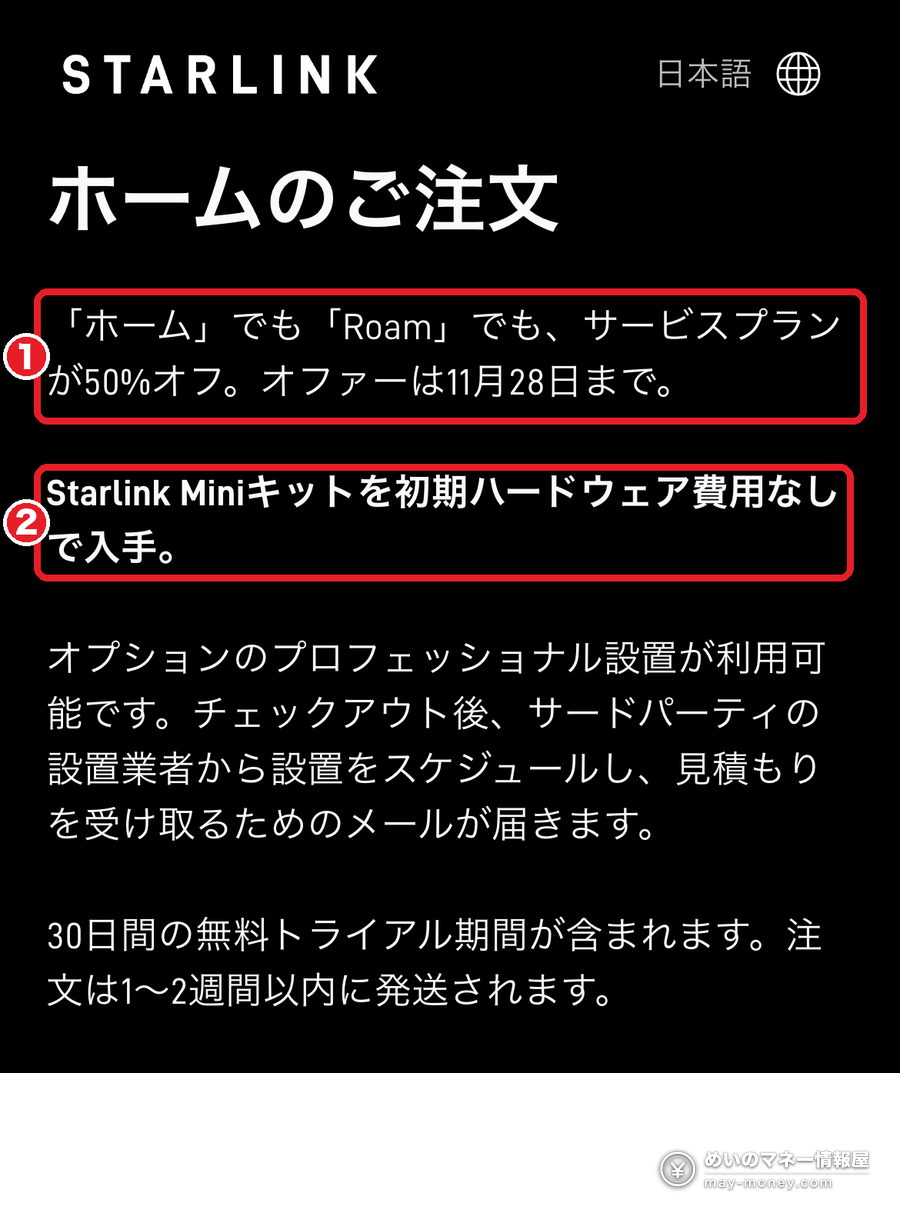
If you have seen “Starlink is half price in Japan” going around social media, it checks out. The Japanese order page currently says service plans are 50% off for both Home and Roam, with the offer running until 28 November.
The Home plan normally costs ¥7,100 a month, so the promotional price is ¥3,550. The hardware is a Starlink Mini plus a small router, and both are rented for ¥0, with no monthly rental fee either. On the day you order, you pay only the ¥3,000 shipping fee plus tax.
Two things worth knowing up front: the kit is a rental, so you send it back if you cancel and you can’t pause the service, and the offer is limited to select areas, so you only see the price after entering your address. Below, we go through the order page step by step.
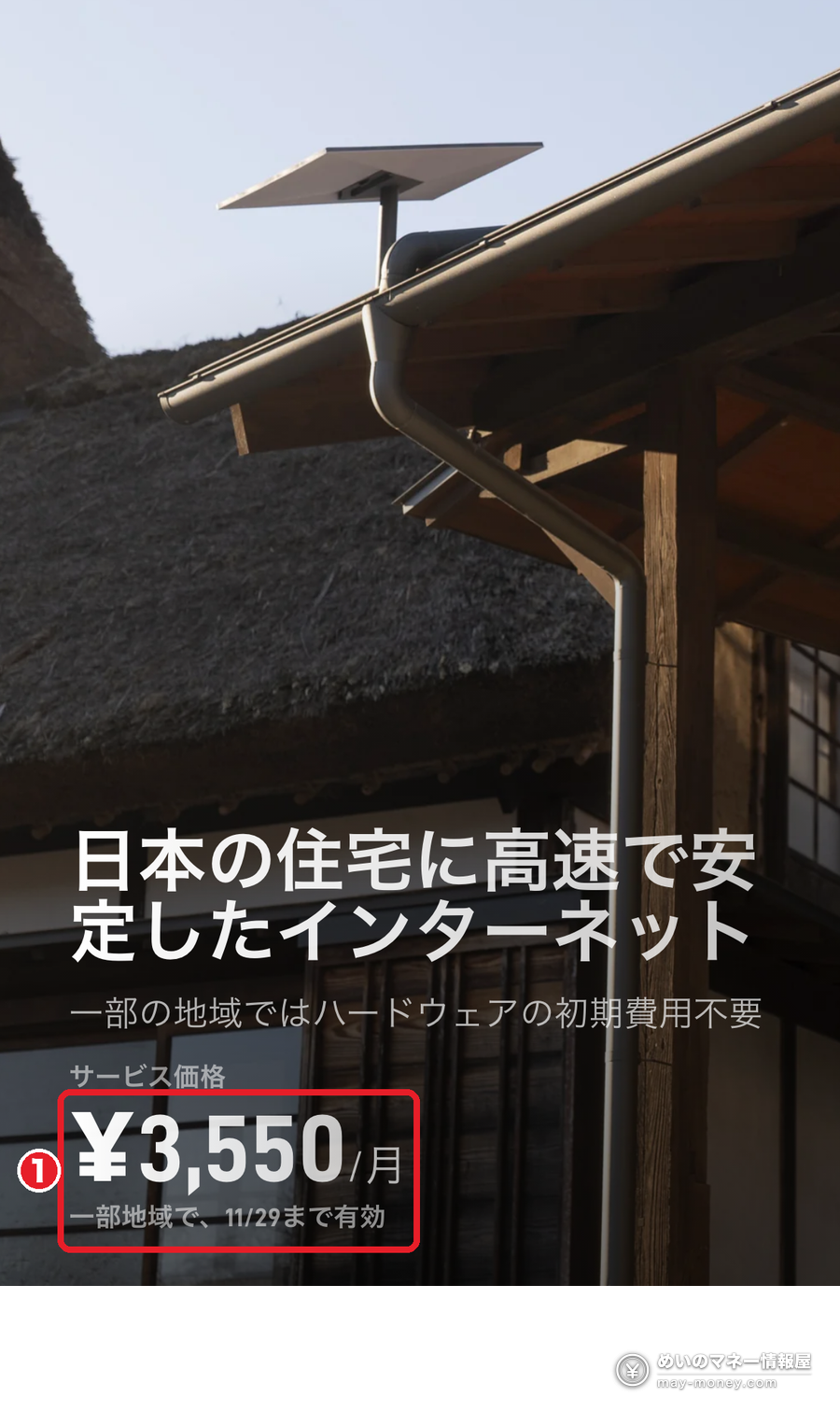
- Home drops from ¥7,100 to ¥3,550 a month, shown as “50% Service Discount −¥3,550” in the order summary
- ¥0 hardware: a Starlink Mini and a small router on rental, with a ¥0 monthly kit fee
- Deadline: the order page says the offer runs until 28 November
- Rental rules: return the kit if you cancel; Standby Mode (pausing) is not available on rentals
- 30-day trial: return the kit undamaged and get the kit price and the first month’s service fee back
- Roam is half price too (100GB: ¥6,920 → ¥3,460 a month), but you buy the Mini, listed at ¥17,400 on the order page
- What is half price and what isn’t
- What the order page charges, day one and monthly
- The kit is a rental: cancelling, pausing and moving
- The 30-day trial and what gets refunded
- Roam is half price too, but you buy the Mini
- Who it suits and who it doesn’t
- How to order
- What about the “¥7,000 referral link” posts?
- Checklist before you order
- FAQ
What is half price and what isn’t
The ¥7,800 for Roam Unlimited is the promotional price on Starlink’s Roam page (also marked “in select areas, valid until 11/29”). All prices as shown on the official site on 31 October 2026.
The home page says “in select areas”. When we entered an address in Shinjuku, Tokyo (the Metropolitan Government Building), the order page showed the half-price plan. Enter your own address and the site tells you straight away.
What the order page charges, day one and monthly
On the Home page, type your address and press “はじめる” (Get started) to reach the order page. The promotion is announced at the top.
Tap the arrow next to “本日お支払額合計” (total due today) to open the breakdown.
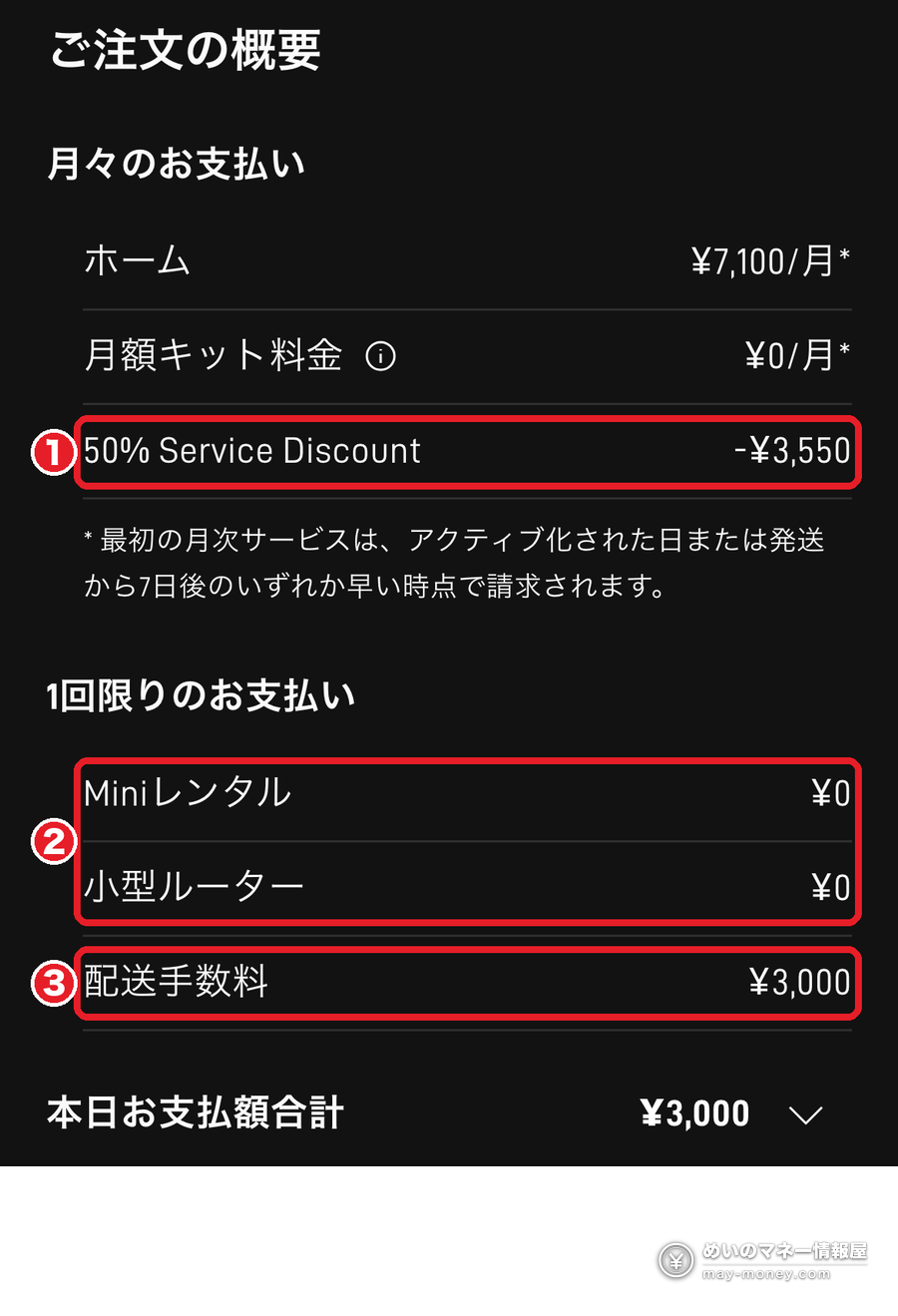
The order page notes that today’s total “may be adjusted after the address is entered”. In checkout screenshots shared on social media, ¥300 tax is added for a total of ¥3,300.
The first monthly charge kicks in on the day you activate or seven days after shipping, whichever comes first (the small print under the summary). In other words, leaving the box unopened won’t delay billing past day seven.
Looking at prices doesn’t place an order. You can close the page any time before pressing “購入手続きを完了する” (complete purchase).
The kit is a rental: cancelling, pausing and moving
The Home hardware is ¥0 because you’re renting it. The order page says that if you cancel the service, you have to return the rented Starlink hardware. Starlink’s help article on rental options adds these rules:
- Return the kit when you cancel. If it doesn’t come back in good condition, you’re charged the full kit price.
- No pausing on a rental. Standby Mode isn’t available, so a holiday home you only use in summer keeps costing money all year.
- No transfers and no moving it to another address. To do either, you first change service plans, which usually means buying the kit or paying a change fee.
- One rental per account, and rentals are for Home plans only.
- Changed your mind after delivery? Return the kit in good condition within seven days of delivery to cancel the rental.
The dish is a Starlink Mini
The dish needs a spot with a wide, clear view of the sky. If you want it installed, the order page offers optional professional installation: after checkout, a third-party installer emails you to schedule and quote (paid separately).
The 30-day trial and what gets refunded
According to the order page, if you cancel and return an undamaged kit within 30 days of the payment due date, you get the kit price and the first month’s service fee back in full. The payment due date is the day billing starts.
Roam is half price too, but you buy the Mini
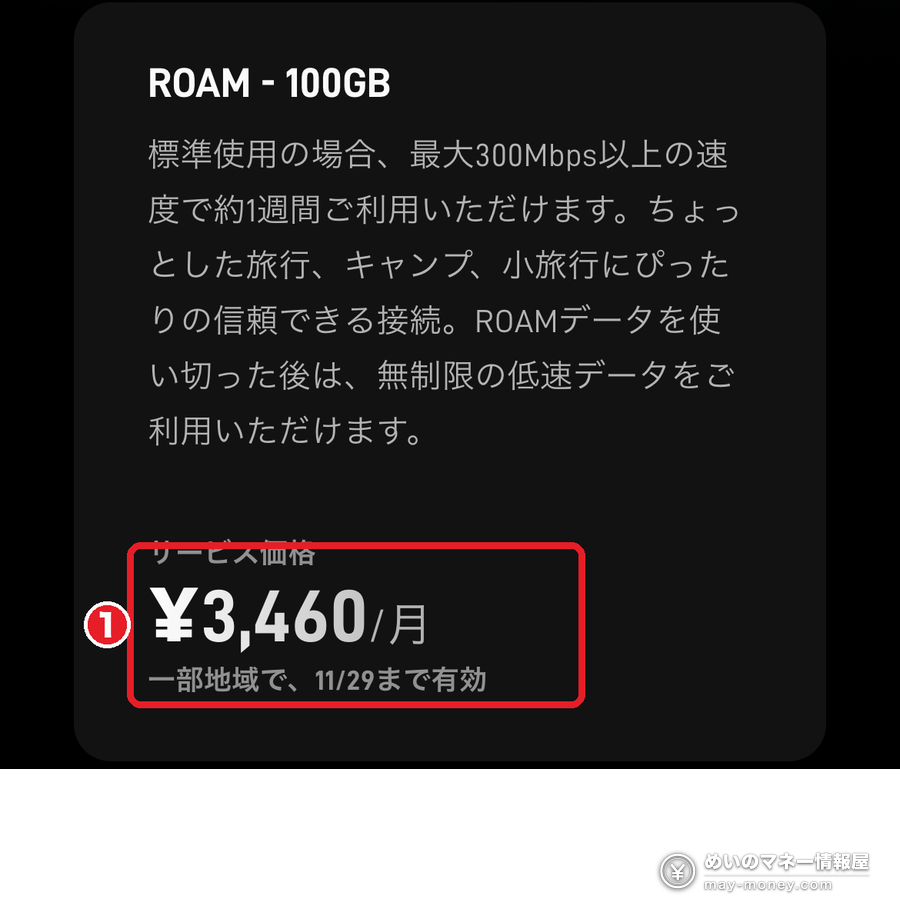
Roam is the portable plan for camping, car trips and travel; Roam Unlimited also covers international travel in 160+ countries and territories. Its service plans are half price as well:
- Roam 100GB: ¥6,920 → ¥3,460 a month. 100GB of high-speed data (about a week of typical use, according to Starlink), then unlimited low-speed data
- Roam Unlimited: ¥7,800 a month (promo price)
- You buy the Mini: the Roam order page lists the Mini kit at ¥17,400 (usually ¥34,800); the estimated total due today including shipping was ¥21,982
- Roam can be paused with Standby Mode (for a small monthly fee), which suits seasonal use
- Used at one address
- Kit rented for ¥0
- Unlimited data
- No pausing; return the kit when you cancel
- Take it anywhere
- Buy the Mini (¥17,400)
- 100GB or unlimited
- Can be paused; the kit is yours
Who it suits and who it doesn’t
- Places where fibre isn’t available or installation takes ages (mountains, islands, holiday homes)
- Splitting time between two homes
- A backup line for disasters that doesn’t share a route with your fibre
- Avoiding installation work and long contracts (as long as you have somewhere to put the dish)
- Low floors in apartment blocks surrounded by tall buildings, with little open sky
- You already have cheap fibre you’re happy with
- You want to pause in the off-season (rentals can’t be paused; consider Roam)
If you simply want home internet without installation work, a mobile home router is worth comparing too. Rakuten Turbo, for example, earns 7,000 points through the employee referral; the details are in our Rakuten Mobile employee referral guide (14,000 points for switching).
How to order
- Open Starlink’s Home page for Japan (starlink.com/en-jp/residential or the Japanese version), enter the installation address and press Get started.
- Check that the order page says service plans are 50% off, with Home at ¥3,550 a month and ¥0 upfront hardware. If it doesn’t, that address isn’t part of the promotion.
- Open the breakdown with the arrow next to the total due today and confirm the 50% Service Discount, the ¥0 Mini rental and the shipping fee.
- Go to checkout, enter your name and contact details, and pay by credit card or PayPal (only shipping and tax are charged that day).
- The kit ships within one to two weeks. Set it up and activate it in the Starlink app; billing starts on activation or seven days after shipping, whichever is earlier.
The monthly fee goes on a credit card, so you can earn points on it. If you need a card, our Rakuten Card sign-up guide explains the welcome points.
What about the “¥7,000 referral link” posts?
Many social media posts share a link saying you’ll get ¥7,000 in cash or Starlink service credit if you sign up through it. That’s Starlink’s official referral program, and its Japanese terms say:
- The person referred gets the same reward as the referrer once they activate
- The amount is shown in the referrer’s account and varies by country
- You must be new to Starlink, buy directly on starlink.com (retailers, resellers and private transfers don’t count) and activate in the same country
- The referrer’s reward only becomes final after the new customer has stayed subscribed for 60 days in a row
Checklist before you order
- Deadline 28 November: the date on the order page.
- Select areas only: enter your address and check the order page shows ¥3,550.
- Rentals can’t be paused: return the kit when you cancel, or pay the full kit price.
- Billing starts even if you don’t set it up: the first month is charged seven days after shipping.
FAQ
- Q. Is Starlink really half price in Japan?
- Yes. On 31 October 2026, Starlink’s Japanese order page said service plans for both Home and Roam are 50% off, with the offer running until 28 November. Home goes from ¥7,100 to ¥3,550 a month.
- Q. When is the deadline?
- The order page says the offer runs until 28 November.
- Q. How much do I pay upfront?
- For Home, the hardware (a Starlink Mini and a small router) is a ¥0 rental, so on the day you order you pay only the ¥3,000 shipping fee, plus tax once your address is confirmed.
- Q. Which areas are eligible?
- Starlink says “select areas”. Enter your installation address on the official site and the order page shows your price. An address in Shinjuku, Tokyo (the Metropolitan Government Building) showed the half price.
- Q. Can I pause the service?
- Not on a Home plan with rented hardware. If you need to pause seasonally, Roam, where you buy the Mini, can be paused with Standby Mode.
- Q. Can I get a refund if it doesn’t work for me?
- Yes. The order page says that if you cancel and return an undamaged kit within 30 days of the payment due date, the kit price and the first month’s service fee are refunded in full.
- Q. Do I get ¥7,000 with a referral link?
- Under the official referral program, the person referred gets the same reward as the referrer on activation, in the amount shown in the referrer’s account. You must be new to Starlink, buy directly on starlink.com and stay subscribed for 60 days.
- Q. Will it work in an apartment?
- The dish needs a wide, clear view of the sky, and tall buildings or trees around it cause dropouts. Check service availability for your address on the official site before ordering, then use the Starlink app’s obstruction check when it arrives.
Sources
- Starlink Home starlink.com/jp/residential (English: en-jp) / Roam starlink.com/jp/roam (viewed 31 October 2026)
- Starlink order page (shown after entering an address; checked with 2-8-1 Nishi-Shinjuku, Shinjuku, Tokyo; no order placed)
- Starlink Help Center: “What are Starlink’s rental options?” (Japanese)
- Starlink “Referral Program Terms” (Japan)
Promotions can change or end early without notice. Check the prices and terms on Starlink’s official site when you order.
Related Articles


Get new articles by email
We will email you when a new deals article goes up. You can choose the categories, too.